

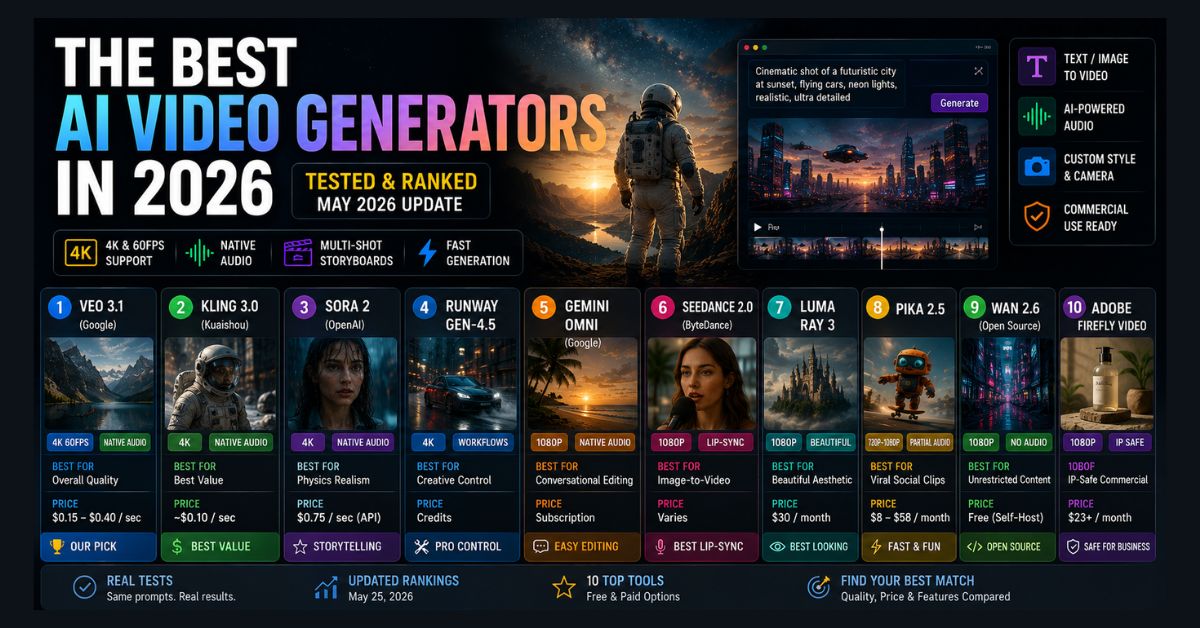
Quick Answer
The best AI video generator in 2026 is Google Veo 3.1 for overall quality, with Kling 3.0 the best value and Higgsfield the best for camera control. These tools lead on resolution, native audio, and prompt accuracy. OpenAI’s Sora 2 is discontinued: the Sora app closed on April 26, 2026, and the API closed on September 24, 2026.
Key Takeaways
- Best overall: Google Veo 3.1 — true 4K/60fps with native audio
- Best value: Kling 3.0 — 4K and native audio at ~$0.10/sec
- Best camera control: Higgsfield — 70+ cinematic motion presets and many models in one subscription
- Sora 2 is discontinued: OpenAI closed the Sora app on April 26, 2026, and removed the Sora 2 API on September 24, 2026
- Now production-ready: Native synced audio, 4K, and multi-shot storyboards are standard in 2026
AI video generation became production-ready in 2026. What produces usable output now, including native synchronized audio, true 4K resolution, multi-shot storyboards, and realistic physics, would have been unthinkable 18 months ago. The tools have moved from “impressive demo” to “real production tool.”
But the landscape has also shifted dramatically in just the past few months. OpenAI shut down the Sora web and app experiences on April 26, 2026, and removed the Sora 2 API on September 24, 2026. Google launched Gemini Omni at I/O with conversational video editing. New models from Kling, Seedance, and Runway have redefined what’s possible at different price points. The funding market is moving just as fast: Higgsfield’s $1.3B valuation shows investors are still betting heavily on specialized AI video startups, even as Google, OpenAI, and Adobe push deeper into the category.
We tested every major AI video generator with the same set of prompts: a cinematic landscape, a character dialogue scene, a product shot, and a stylized motion effect. We ranked them on quality, speed, pricing, and practical usability. Here are the 12 that matter in October 2026, including Higgsfield, the camera-control specialist that has quickly become a favorite of social and ad creators.
Quick Comparison Table
| Tool | Best For | Free Tier | Resolution | Audio | Price |
|---|---|---|---|---|---|
| Google Veo 3.1 | Overall quality | Limited | 4K 60fps | Native | $0.05-0.60/sec |
| Kling 3.0 | Best value | Yes | 4K | Native | ~$0.10/sec |
| Sora 2 | Physics realism | No | 4K | Native | Discontinued (API closed Sept. 24, 2026) |
| Runway Gen-4.5 | Creative control | Yes (limited) | 4K | Native | Credits |
| Higgsfield | Camera control & social | Yes (watermarked) | Up to 1080p (model-dependent) | Model-dependent / lip-sync | From ~$15/mo |
| Gemini Omni | Conversational editing | Yes (AI Plus+) | 1080p | Native | Subscription |
| Seedance 2.0 | Image-to-video | Limited | 1080p | Native lip-sync | Varies |
| Luma Ray 3 | Beautiful aesthetic | Yes (watermarked) | 1080p | No | $30/mo |
| Pika 2.5 | Viral social clips | No free credits (packs only) | 720p-1080p | Partial | From $8/mo |
| Wan 2.2 | Unrestricted content | Open-source | 1080p | No | Free (self-host) |
| Adobe Firefly Video | IP-safe commercial | 25 credits/mo | 1080p | No | $23+/mo |
| Krea | Multi-model AI video workflow | Available | Model-dependent | Model-dependent | Varies |
1. Google Veo 3.1 — Best Overall
Veo 3.1 is the most technically advanced AI video model available. It generates true 4K video at up to 60fps with native 48kHz audio — ambient sound, dialogue, and sound effects produced in a single pass alongside the video. No other model matches this combination of resolution, frame rate, and audio quality in a single generation.
In our testing, Veo 3.1 produced the most realistic lighting, the most consistent character appearance, and the best prompt adherence. Its knowledge of the real world (inherited from Google’s search training data) means it handles specific locations, cultural references, and product appearances more accurately than competitors.
The tiered Gemini API pricing lets you choose quality-vs-cost for each shot. As of October 2026, Google’s pricing page lists Veo 3.1 Lite at $0.05 per second at 720p and $0.08 at 1080p, Veo 3.1 Fast at $0.10 to $0.30 per second depending on resolution, and Veo 3.1 Standard at $0.40 per second at 720p and 1080p or $0.60 at 4K. For production work, Standard tier is the clear choice. For prototyping, Lite costs one-fifth of the Standard rate at 1080p, although Lite does not support 4K output.
At Google I/O, Google also launched Gemini Omni — a conversational video editing model that lets you modify videos through natural language (“make it sunset lighting,” “add a city skyline”). Omni isn’t a replacement for Veo’s generation quality, but it adds an editing layer no other platform offers.
Best for: Cinematic ads, product launches, brand storytelling, any project where visual quality is the top priority.
2. Kling 3.0 — Best Value
Built by Kuaishou (the Chinese short-video giant behind Kwai), Kling 3.0 is the best value in AI video generation. At approximately $0.10 per second, it delivers quality that’s competitive with models costing five times more.
Kling 3.0 matches Veo on cinematic lighting and handles complex motion (hair, liquids, fabric) exceptionally well. Its multi-shot storyboard mode with native audio sync across cuts is particularly useful for content that tells a story across multiple scenes.
The free tier provides enough credits for testing and light personal use. Paid plans unlock priority generation, 4K output, and commercial licensing.
Kuaishou announced Kling 4.0 on September 28, 2026. According to Kling’s comparison of the two versions, Kling 4.0 extends native clips from 15 seconds to 30 seconds and adds up to 10 keyframes, 10-bit HDR output at 1080p and 4K, and two-channel stereo audio (self-reported). Kling 4.0 Flash opened to a limited group of early-access users on September 28, and the full model is scheduled to launch in October 2026. This matters because the ranking here is based on Kling 3.0, so Kling 4.0 pricing and test results are not yet reflected in this guide.
Best for: Creators who need lots of iterations without premium pricing. Social media content, YouTube intros, and rapid prototyping.
3. Sora 2 — Best Physics Realism (With a Caveat)
Sora 2 produced some of the most physically realistic clips in the market: objects interacted naturally, liquids behaved correctly, and camera work felt genuinely cinematic. Its storytelling capabilities were also strong for narrative-driven content.
However, there is a critical caveat: Sora 2 is no longer available. OpenAI shut down the Sora web and app experiences on April 26, 2026, and OpenAI’s API deprecations page shows that the Videos API and the Sora 2 and Sora 2 Pro models were removed on September 24, 2026, with no recommended replacement listed. This matters because the API was the last remaining way to generate Sora 2 video, so tools that relied on it lose that access. For our detailed Sora tutorial, note that the features described no longer work after the shutdown.
At $0.75 per second via API, Sora 2 was also the most expensive option on this list before the shutdown.
Best for: No new projects, because Sora 2 can no longer be used. Teams that relied on Sora 2 for physics-heavy shots should test Veo 3.1 or Kling 3.0 on the same prompts before choosing a replacement.
4. Runway Gen-4.5 — Best Creative Control
Runway remains the professional’s favorite for one reason: granular creative control. Camera moves, motion brush, reference-driven character consistency, and a full editing suite within the same platform. Gen-4.5 improved character detail stability and added 4K support. Runway also states that Gen-4.5 supports native audio generation and audio editing, so dialogue, sound effects, and background audio no longer require a separate tool.
Where Veo and Kling generate videos from prompts and hope for the best, Runway lets you specify exactly how the camera should move, which elements should be in motion, and how the scene should evolve frame by frame. For professional motion designers and filmmakers, this control is worth the premium.
The credit-based pricing system is less transparent than per-second billing, but the free tier provides enough credits to test the platform thoroughly.
Best for: Professional filmmakers, motion designers, and anyone who needs precise control over camera work and scene composition.
5. Higgsfield — Best for Cinematic Camera Control
Higgsfield is the newest addition to this list and the one built specifically around how your footage moves, not just what it shows. Launched in 2024 and rapidly updated since, it carved out a niche most AI video tools ignore: director-style camera control paired with cinematic style presets, aimed squarely at short-form, ads, and branded content.
Its signature feature, Cinema Studio, offers more than 70 camera-motion presets — bullet time, crash zoom, dolly shot, 360 rotation, FPV, and dozens of viral motion templates. Instead of prompt-engineering a “slow dolly zoom” out of a general model and getting a static, lifeless clip, you pick the shot the way you would on a film set, and the underlying model handles execution. For motion-heavy social video, that is a genuine unlock, and it is what separates Higgsfield from a plain text-to-video box.
Higgsfield is also a multi-model aggregator, giving you access to many of the models elsewhere on this list, including Veo and Kling, under a single subscription, alongside character-consistency tools and a large VFX library. Paid plans start at around $15 a month, and there is a free plan, though it works more like a trial: roughly 10 credits a day, watermarked exports, and limited model access. Its backing is serious, as its recent $1.3B valuation shows.
The honest trade-off is cost predictability. Higgsfield runs on credits that do not roll over, and iterating on a shot can burn several times the base cost before you get a keeper, so heavy users should watch their spending. It is also aimed at short-form rather than long-form, frame-precise professional edits, where Runway still leads.
Best for: Social-first creators, performance marketers, and short-form filmmakers who want cinematic camera moves and access to many models from one subscription.
6. Gemini Omni — Best for Conversational Video Editing
Announced at Google I/O on May 19, Gemini Omni takes a fundamentally different approach. Instead of generating finished videos from text prompts, it lets you edit and transform video through conversation. Upload a selfie and Omni transforms it into a professional scene. Describe changes like “make it sunset,” “add rain,” or “change the background to a beach,” and Omni applies them in real time.
This isn’t competing with Veo on raw generation quality. It’s a new category: conversational video editing. It’s available to Google AI Plus, Pro, and Ultra subscribers with a free preview through YouTube Shorts. For developers, Google’s Gemini API pricing page lists Omni video output at approximately $0.10 per second at 720p as of October 2026.
Best for: Quick video edits, social media content creation, and anyone who wants video manipulation without learning professional editing software.
7. Seedance 2.0
Seedance 2.0 (by ByteDance) is the strongest image-to-video model available. Upload a photo and Seedance animates it with remarkably natural motion, maintaining the original composition and style. Its lip-sync capability, which generates audio that matches mouth movements from a still image, is best-in-class.
ByteDance released Seedance 2.5 on July 31, 2026. According to ByteDance, Seedance 2.5 generates audio and video together in clips of up to 30 seconds, compared with 15 seconds for Seedance 2.0 (self-reported). The ranking in this guide is based on Seedance 2.0 testing, so check which version your platform offers before comparing results.
Best for: Animating product photos, character-driven content from reference images, and lip-synced talking-head videos.
8. Luma Ray 3
Luma Ray 3 produces the most aesthetically beautiful output of any model — its default color grading and composition feel like they were art-directed by a cinematographer. Draft mode enables rapid iteration (clips in under 30 seconds). The interface is also the most elegant on this list.
Luma announced Ray3.2 on June 9, 2026. According to Luma, Ray3.2 adds frame-level control with up to 16 keyframes per clip and supports clips of up to 20 seconds at 1080p. The assessment below is based on Ray 3 testing.
Quality doesn’t match Veo or Kling on pure realism, but if your content prioritizes visual beauty over photorealism, Ray 3 is the right choice.
Best for: Art-directed content, mood pieces, atmospheric visuals, and creators who value aesthetic quality over raw realism.
9. Pika 2.5
Pika is the fastest and most playful tool on this list. Generation times are short, the interface is dead simple, and the output is optimized for social media virality rather than cinematic production. Its “Pikaeffects” feature adds viral-style motion effects that trend on TikTok and Reels.
As of October 2026, Pika’s pricing page lists a free plan with no monthly credits (credit packs only), and paid plans start at $8 a month with annual billing or $10 billed monthly. Quality is lower than premium tools, but the speed and simplicity make it ideal for high-volume social content where fast and good enough beats slow and perfect.
Best for: Social media content creators, TikTok/Reels/Shorts, and anyone prioritizing volume and speed over quality.
10. Wan 2.2 (Open-Source)
Wan 2.2 is the strongest open-source video generation model in Alibaba’s Wan family. As of October 2026, Alibaba’s Wan-AI page on Hugging Face publishes downloadable weights for Wan 2.1 and Wan 2.2 only, and Alibaba has not published Wan 2.6 weights there. This matters because the newer Wan 2.6 can be used through hosted platforms but cannot be self-hosted. You can run Wan 2.2 locally (GPU required) or access it through various hosted platforms. No content restrictions, no subscription fees, complete control over output.
The hosted Wan 2.6 is competitive with Kling on most prompts, while the downloadable Wan 2.2 is an older generation that you should test on your own prompts. The trade-off is accessibility — running it locally requires a capable GPU (16GB+ VRAM) and technical setup. For privacy-sensitive projects or unrestricted creative work, it’s the best option.
Best for: Developers, privacy-conscious creators, and anyone who needs unrestricted generation without platform policies.
11. Adobe Firefly Video
Adobe Firefly Video is the safest choice for commercial projects. Like Adobe Firefly for images, the video model is trained exclusively on licensed content — no copyrighted training data means no IP risk for commercial use.
Video quality is behind the leaders (Firefly is stronger on images than video), but for marketing teams and agencies who need bulletproof IP provenance, the legal safety premium is worth it. Integration with Premiere Pro makes it part of an existing professional workflow.
Best for: Commercial advertising, client work, and any project where IP provenance matters more than the latest quality.
12. Krea: Best Multi-Model Workspace
Krea is a multi-model AI video workspace that lets you generate from text or images and compare outputs across leading models such as Veo 3.1, Kling 3.0, Wan 2.6, Runway Gen-4.5, and Seedance. It also brings tools such as frame control, clip extension and merging, parallel generations, and supported native-audio workflows into the same interface.
Rather than competing as a single foundation model, Krea is most useful as a unified workflow layer. That makes it a practical choice for creators who want to test different models for different shots without jumping between separate platforms and subscriptions.
Best for: Creators and teams who want access to multiple leading AI video models and refinement tools in one workspace.
How to Choose the Right Tool
Best overall quality: Veo 3.1 (Standard tier). Best value: Kling 3.0 — comparable quality at 4-7x lower cost. Best free option: Kling free tier. Best for creative control: Runway Gen-4.5. Best for cinematic camera moves and multi-model access: Higgsfield. Best for commercial safety: Adobe Firefly Video. Best for social media: Pika 2.5, Higgsfield, or Gemini Omni. Best open-source: Wan 2.2.
Most production teams in 2026 use 2-3 models for different shot types rather than committing to a single tool, which is exactly why aggregator platforms like Higgsfield have taken off. This matches the same pattern we see in AI image generation and AI music creation — the best workflow combines specialist tools.
Important: Content Safety and Legal Considerations
AI video generation raises serious content safety concerns. The TAKE IT DOWN Act entered full enforcement on May 19, 2026, requiring platforms to remove non-consensual intimate AI-generated imagery within 48 hours. Stop here and check a tool’s content policy and licensing terms before using AI clips commercially, since the rules vary and you are responsible for what you generate. Most commercial video generators have implemented content filters, but open-source tools like Wan 2.2 have no such restrictions, so users bear full legal responsibility for what they create.
All commercial platforms now embed C2PA metadata in generated videos to indicate AI origin. This metadata is increasingly required for platform distribution and may become a legal requirement in more jurisdictions.
FAQ
What happened to Sora?
OpenAI shut down the Sora web and app experiences on April 26, 2026, and removed the Sora 2 API on September 24, 2026, so Sora 2 is no longer available. See our breakdown of why OpenAI shut down Sora for the background, and consider Veo 3.1 or Kling 3.0 instead.
What is Higgsfield and who is it for?
Higgsfield is a creative AI video platform built around cinematic camera-motion presets and access to many underlying models under one subscription. It is best for short-form social video, ads, and creators who want director-style camera control, though its credit-based pricing can be unpredictable.
Which AI video generator is free?
Kling 3.0, Luma Ray 3, Runway Gen-4.5, and Higgsfield all offer free tiers with limited, often watermarked generations. Wan 2.2 is completely free if you self-host it, and Google Gemini Omni is available through YouTube Shorts for free.
Can I use AI-generated videos commercially?
Yes, on paid plans from most tools, including Veo, Kling, Runway, Luma, and Higgsfield. Adobe Firefly is the safest for commercial use because it is trained on licensed content only, and you should always check current terms of service.
Which AI video generator has the best audio?
Veo 3.1 Standard tier produces the highest quality synchronized audio (48kHz), and Seedance 2.0 has the best lip-sync for talking-head content. Kling 3.0 and Runway Gen-4.5 also generate native audio, while Luma, Pika, and Adobe require separate audio workflows.
How much does AI video generation cost?
AI video generation costs about $0.05 to $0.60 per second on Google’s Veo 3.1 API as of October 2026, and Kling 3.0 costs about $0.10 per second, so a 30-second video costs roughly $1.50 to $18. Subscription plans start at around $8 a month (Pika, billed annually), while self-hosting Wan 2.2 is free but needs GPU hardware.