

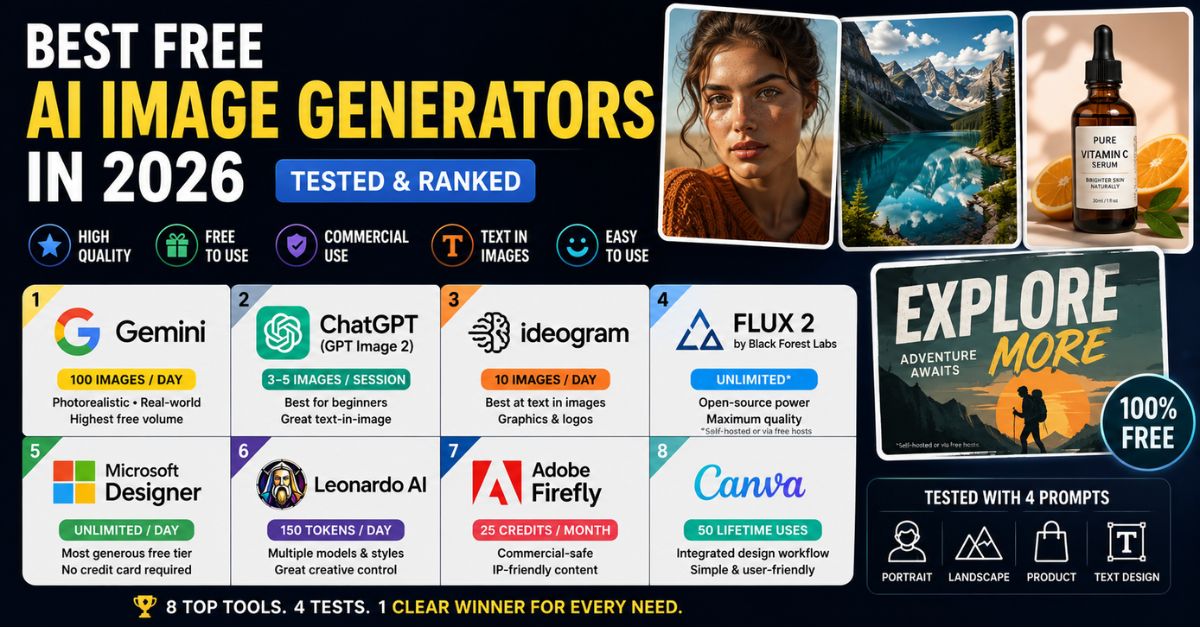
The AI image generation landscape has matured dramatically since the early days of Midjourney and DALL-E. In 2026, dozens of tools claim to be the best — but when you actually test them with identical prompts, the quality gap between the leaders and the rest is enormous.
We tested every major free AI image generator with a consistent set of four prompts: a photorealistic portrait, a landscape scene, a product shot, and a graphic design element with text. Here are the nine tools that actually delivered usable results without paying anything.
How We Tested
Every tool was evaluated on five criteria using identical prompts.
- Image quality — how realistic, detailed, and visually coherent are the outputs? We checked for common failure points like hands, text legibility, face consistency, and lighting.
- Free tier generosity — how many images can you create for free per day or month? Are there hidden limitations like queue wait times or resolution caps?
- Text rendering — can the tool generate readable text inside images? This matters for marketing graphics, social posts, and branded content.
- Commercial use rights — can you legally use the generated images in client work, products, or marketing materials?
- Ease of use — does it require prompt engineering expertise, or can a beginner get good results with plain language descriptions?
1. Design.com
Best for: AI image generation combined with an all-in-one design workflow
Design.com stands out because it goes beyond simply generating an image. Its AI Image Generator lets you describe what you want in everyday language, generate multiple visual directions, refine your prompt, and then take the result straight into a broader suite of design tools. That makes it particularly useful for creators, marketers, and businesses that want to move quickly from an initial idea to a finished piece of content.
The generator supports a wide range of subjects and styles, with control over details such as the setting, lighting, mood, colors, and composition. The real advantage, though, is what happens after generation: images can be incorporated into social media graphics, website visuals, presentations, posters, flyers, and branded designs without having to jump between several different platforms.
For beginners, that integrated workflow makes Design.com one of the easiest places to start. You don’t need advanced prompt-engineering or professional design experience, and its wider collection of AI tools also covers logos, websites, business cards, posters, flyers, presentations, and other brand assets.
2. Google Gemini (Nano Banana 2)
Free limit: Compute-based daily allowance (Google publishes no fixed image count) Commercial use: Yes, with attribution Best for: Photorealistic images, highest free volume
Google’s Nano Banana 2 model raised the bar for free AI image generation when it launched in early 2026. It produces native 4K resolution images and leverages Google’s search index to accurately depict real-world locations, landmarks, and cultural references without requiring detailed descriptions.
In our testing, Nano Banana 2 delivered the most consistent and realistic results across all prompt types. Faces are remarkably natural, hands are handled well, and lighting follows real-world physics. The standout feature is its knowledge — ask for an image of a specific building or cultural reference, and Gemini knows what it actually looks like.
The free tier is usable for casual work, but it is no longer a fixed 100 images per day. As of September 2026, Google’s Gemini Apps limits page lists image generation with Nano Banana 2 on the free plan without a published number and describes usage limits as compute-based, so heavier prompts and edits use up the allowance faster. Google also keeps a visible Gemini sparkle watermark on images from free and Google AI Pro accounts. Content moderation is strict though — if your prompt touches anything Gemini considers sensitive, it will refuse. Google has been expanding Gemini’s capabilities across its entire Workspace suite, and the image generation is part of that broader push.
3. ChatGPT (GPT Image 2)
Free limit: ~3-5 images per session on free tier Commercial use: Yes Best for: Beginners, conversational iteration, text-in-image
ChatGPT’s image generation is the most accessible option on this list. You describe what you want in conversational language — no prompt engineering required — and iterate through natural conversation. “Make the background darker,” “Move the text to the top,” “Change the person’s shirt to blue” — this back-and-forth workflow is something no other free tool matches. If editing existing images is your main goal rather than generating new ones from scratch, our guide to the best free AI photo editors breaks down the tools that handle background removal, object cleanup, retouching, and style edits best.
GPT Image 2, powered by GPT-5.4, also leads the field in text rendering. If you need an image that includes readable words — a poster, a social media graphic, a product label — ChatGPT handles it more accurately than any competitor.
The significant downside is the free tier limit. You get very few generations before hitting the cap, and it resets slowly. If you’re getting errors while using ChatGPT, that further limits how many images you can generate in a session.
OpenAI released ChatGPT Images 2.5 on September 8, 2026, and began rolling it out to all ChatGPT users. OpenAI says the update makes generation faster and keeps details more consistent across repeated edits, and it adds Sketch, templates, and image comments for pointing at the exact part of an image you want changed. Free-tier limits still apply, so the update improves iteration quality rather than volume.
4. Ideogram
Free limit: 10 slow-queue generations/day Commercial use: Yes Best for: Text in images, graphic design, logos
If your primary need is generating images with legible text, Ideogram is the specialist tool. While most generators mangle typography, Ideogram was purpose-built for text-in-image accuracy. Quotes on posters, product labels, branded cards, social media graphics with headlines — Ideogram handles all of these more reliably than any other tool.
The free plan provides 10 slow-queue generations per day. Image quality for non-text content is solid but not class-leading; you’ll get better photorealism from Gemini or FLUX.
5. FLUX 2 (Black Forest Labs)
Free limit: Varies by host (unlimited if self-hosted) Commercial use: Outputs yes; model license varies by version Best for: Advanced users, maximum quality, local generation
FLUX 2 is the current king of open-source image generation. It produces highly realistic images with exceptional detail in textures, lighting, and composition. In our testing, it generated the most creative and detailed output of any tool.
The catch is accessibility. FLUX 2 is primarily a model, not a consumer product. Running it locally requires a capable GPU (16GB VRAM recommended), or you can access it through free web interfaces like Hugging Face Spaces. For users with technical skills and hardware, FLUX 2 offers unlimited free generation with zero content restrictions and complete control.
Licensing depends on the version you run. According to Black Forest Labs’ FLUX.2 repository, FLUX.2 [klein] 4B is released under the Apache 2.0 license, while FLUX.2 [dev] and FLUX.2 [klein] 9B use the FLUX Non-Commercial License. The non-commercial license still allows you to use the generated images for commercial purposes, but offering the model itself inside a commercial product requires a paid license from Black Forest Labs.
6. Microsoft Designer (DALL-E 3)
Free limit: Free with a Microsoft account; heavier use may require a subscription Commercial use: No (personal, non-commercial use) Best for: Personal projects, Microsoft ecosystem
Microsoft Designer is free to use with a Microsoft account, but it is no longer the unlimited option it once was. Microsoft’s Designer FAQ states that a subscription may be required for people who want to create more frequently, and that Designer is licensed for personal, non-commercial use with a Microsoft account. That licensing matters because images made on the free account should not be used in client work or products you sell.
The underlying DALL-E 3 model produces clean, well-composed images that are particularly strong for illustration-style outputs, product mockups, and presentations. Photorealism isn’t at Gemini’s level, but for personal social posts and presentations, the quality is more than sufficient. No credit card required to sign up.
7. Leonardo AI
Free limit: 150 tokens/day (~5-10 images) Commercial use: Yes Best for: Stylized art, multiple models, creative experimentation
Leonardo AI offers the most model variety of any free tool. Where most generators lock you into a single model, Leonardo lets you switch between options optimized for different styles — photorealistic, anime, concept art, fantasy, product photography, and more.
The free tier gives 150 daily tokens, translating to roughly 5-10 images depending on settings. The additional control over parameters like guidance scale and resolution gives more creative flexibility than most free alternatives.
8. Adobe Firefly
Free limit: Free daily generations (no plan required) Commercial use: Yes (IP-safe, trained on licensed content) Best for: Commercial use without legal risk
Adobe Firefly’s biggest differentiator isn’t quality — it’s legal safety. Adobe says its Firefly models are trained on licensed content and public domain content where copyright has expired, making them the safest option for commercial projects. If you’re generating images for client work or products you sell, Firefly gives peace of mind that no copyrighted training data was involved.
Adobe changed the free tier in 2026. Adobe’s Firefly plans page now says you do not need a plan to get free daily generations across image, video, and audio, with limits that refresh every day, replacing the earlier 25-credit monthly allowance. Adobe also offers partner models such as Google’s Nano Banana inside Firefly, and its statement about training on licensed and public domain content applies to Adobe’s own Firefly models, so choose a Firefly model when legal provenance is the priority. For Creative Cloud subscribers, Firefly integrates tightly with Photoshop and Illustrator, making it part of an existing design workflow.
This is also where AI safety considerations matter — governments are increasingly cracking down on AI-generated imagery, and using tools like Firefly with clear provenance reduces legal risk.
9. Canva AI Image Generator
Free limit: 50 lifetime uses on free plan Commercial use: Yes Best for: Non-technical users, integrated design workflow
Canva’s built-in generator won’t win quality competitions, but its workflow integration is unmatched. Generate an image and immediately drag it into your Canva design — social graphic, presentation, poster, or any template. For users comparing presentation workflows, Canva is simple, while Google users may prefer learning how to use AI images in Google Slides directly inside their existing workspace.
The free plan gives 50 lifetime generations (not daily — lifetime), which is quite limited. But for non-technical users who need a simple end-to-end workflow, Canva is the path of least resistance.
Which Should You Use?
For most people, Google Gemini is the best starting point — high-quality results and a free allowance that covers casual use. For text-heavy images, add Ideogram. For the simplest workflow, use ChatGPT. For maximum quality and control, explore FLUX 2.
The reality in 2026 is that using 2-3 tools for different purposes works better than trying to find one that does everything. If you’re also interested in AI video rather than images, check our roundup of the best AI video generators, and if you want to turn your AI-generated images into videos, we have a guide for that too.
For a broader view of which AI platforms are best for different tasks beyond image generation — writing, coding, research — see our Claude vs ChatGPT vs Gemini comparison. And if you use Google Workspace, you can generate images directly inside Slides using our Gemini in Docs, Sheets & Slides tutorial.
FAQ
1. Which free AI image generator is truly unlimited?
No hosted free AI image generator is truly unlimited in 2026, because Google Gemini, Microsoft Designer, ChatGPT, and the other web tools all apply usage limits. Truly unlimited generation requires running an open-weight model such as FLUX.2 [klein] 4B on your own GPU.
2. Can I use free AI-generated images commercially?
Most tools on this list allow commercial use, but terms vary, and Microsoft Designer is licensed for personal, non-commercial use only. Adobe Firefly’s own models are the safest for commercial use because Adobe says they are trained on licensed and public domain content. Always check each tool’s current terms of service before using generated images in paid projects or client deliverables.
3. Which AI image generator handles text best?
Ideogram and ChatGPT (GPT Image 2) are the leaders for generating readable text inside images. Most other tools still struggle significantly with typography — letters get jumbled, mirrored, or rendered as gibberish.
4. Do free AI image generators add watermarks?
Ideogram, Microsoft Designer, and Leonardo AI do not add visible watermarks to free-tier images, but Google Gemini does: Google keeps a visible Gemini sparkle on images from free and Google AI Pro accounts. Some tools also embed invisible markers indicating AI generation, such as Google’s SynthID or C2PA metadata, but these do not affect visual quality or usability.
5. Are AI-generated images safe to use on social media?
Generally yes, but be aware that platforms are increasingly requiring disclosure of AI-generated content. The legal landscape around AI imagery is evolving, with governments worldwide pushing for regulation. For professional use, using tools with clear commercial licenses protects you.