

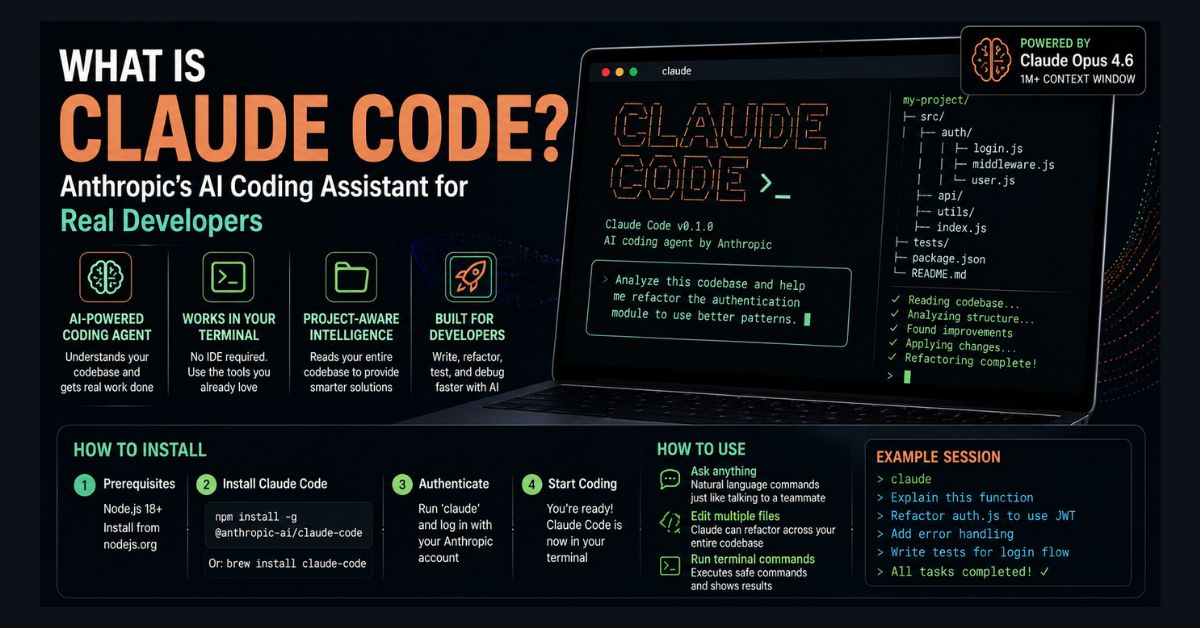
Quick Answer
Claude Code is Anthropic’s command-line AI coding agent. It reads your whole codebase, plans changes, edits files, runs tests, and works with git from your terminal. Unlike autocomplete tools, it operates at the project level. It needs a paid Claude plan and installs through Anthropic’s native installer.
Key Takeaways
- Claude Code is a terminal agent that acts on your project, not a line-by-line autocomplete tool
- It now defaults to Claude Sonnet 5 on Pro seats and Claude Opus 5 on Max, replacing the older Opus versions
- Anthropic now recommends the native installer over npm, and native Windows no longer requires WSL
- There is no free tier: Claude Code requires a Pro, Max, Team, Enterprise, or Console account
- It asks permission before editing files by default, which matters most on proprietary code
Claude Code is Anthropic’s command-line AI coding agent, a terminal tool that reads your codebase, plans changes, executes them with real development tools, and iterates on the results. Unlike IDE assistants that autocomplete one line at a time, Claude Code works at the project level: it understands your whole repository, reasons through multi-file changes, and can handle complex engineering tasks with limited supervision.
If you have used Claude the chatbot for coding help and wished it could directly edit your files, run tests, and commit code, that is what Claude Code does.
How is Claude Code different from Copilot and Cursor?
Claude Code differs from Copilot and Cursor structurally: it runs in your terminal as an autonomous agent, rather than as autocomplete in your editor. The AI coding market has split into three shapes, and they are IDE extensions, AI-native editors, and terminal agents.
The difference shows up in what each does with the same request. Ask GitHub Copilot to “add error handling to this function,” and it suggests code for the function on your screen. Ask Claude Code the same thing, and it scans the whole project for functions that lack error handling, plans which ones to change, edits them across multiple files, runs your test suite to check nothing broke, and shows you the results. For how it stacks up against Copilot, Cursor, and the rest, see our best AI coding assistants roundup and our ChatGPT vs Claude vs Gemini for coding comparison.
Claude Code runs on Anthropic’s Claude models. As of mid-2026 it defaults to Claude Sonnet 5 on Pro, Team Standard, and Enterprise seats, and to Claude Opus 5 on Max, replacing the earlier Opus versions, with a 1M-token context window that lets it reason across large codebases. Anthropic reports strong results for these models on coding benchmarks such as SWE-bench (self-reported); independent testing varies, and benchmark scores are a rough guide rather than a guarantee for your codebase.
Who is Claude Code for?
Claude Code is built for developers comfortable in the terminal, and it is not a beginner tool. It assumes you know git, package managers, build systems, and basic software architecture.
Newer programmers who already have the fundamentals can still get value from it once they are ready to review changes carefully, run tests, and follow why the agent makes specific edits. If that is you, start with our guide to learning to code with AI first. Claude Code is particularly strong for backend work in Python, Node.js, TypeScript, and Go, for full-stack refactoring, for writing test suites, for codebase migrations such as JavaScript to TypeScript, and for debugging issues that span multiple files.
How do you install Claude Code?
Install Claude Code with Anthropic’s native installer, which is now the recommended path for most users. The old npm method still works but is now the advanced option, and it carries a Node.js version requirement the native installer avoids.
Install it in four steps:
- Run the native installer. On macOS, Linux, or WSL, run
curl -fsSL https://claude.ai/install.sh | bash. On Windows, Anthropic provides a PowerShell installer and a WinGet package that produce a native Windows binary, so WSL is no longer required. Per Anthropic’s official Claude Code documentation, the native installer has zero dependencies and auto-updates. - Authenticate. Run
claudeand it opens your browser to log in to your Anthropic account. Credentials are stored locally. - Open your project. Change into the root of any repository. Claude Code detects your project structure, reads your package.json or equivalent, and indexes relevant files.
- Start a session. Type
claudeto launch the interactive session, then describe what you want in plain language.
If you prefer the npm route for CI pinning or team standardization, run npm install -g @anthropic-ai/claude-code, which now requires Node.js 22 or newer. Do not install it with sudo, and if you switch from npm to the native build, remove the npm copy with npm uninstall -g @anthropic-ai/claude-code so the two versions don’t conflict on your PATH. Run claude doctor if anything misbehaves; it checks your PATH, authentication, and install type.
What can you actually do with Claude Code?
Claude Code handles whole tasks rather than snippets, and the clearest way to see that is by example. These are the jobs it does well, and they are understanding a codebase, multi-file refactoring, writing tests, debugging, and git work.
- Understand a new codebase. Ask it to explain the architecture, the main modules, how they interact, and where the entry point is. It reads the files, analyzes imports and dependencies, and returns a clear summary.
- Refactor across files. Ask it to switch the authentication module from session cookies to JWT tokens and update every route, the middleware, and the tests. It plans the change, edits the files, fixes imports, and adjusts tests, asking permission before each file edit by default.
- Write tests. Ask for unit tests covering all public methods and edge cases using your existing Jest config. It reads your test setup and follows your project’s conventions.
- Debug. Tell it a specific endpoint returns a 500 error when a subscription has expired. It traces the request flow, finds the root cause, explains it, and proposes or implements the fix.
- Work with git. Ask it to review your branch and write a commit message, summarize the diff against main, or draft a pull request description from your commits.
What are Claude Code’s main features?
Claude Code’s defining features are its cautious default, project memory, parallel agents, and MCP support. Together they make it configurable to how your project actually works.
Cautious by default means it asks permission before modifying files or running commands, showing you the plan and waiting for confirmation. You can loosen this, but the default is conservative. Project memory lets it store context such as coding conventions and architecture decisions in a project configuration file, so it improves as it learns your repository. On higher-tier plans, it can run parallel agents that work on different parts of a task at once, such as one refactoring the API while another updates the tests. And its support for the Model Context Protocol (MCP) lets it connect to external tools such as databases, APIs, and monitoring systems, extending it beyond reading and writing code.
How much does Claude Code cost?
Claude Code requires a paid Anthropic plan and has no free tier. Pricing is measured in tokens processed, so complex tasks on large codebases cost more.
US plan pricing at the time of writing runs from Claude Pro at $20/month with standard usage limits, through Claude Max at $100/month for 5x usage and $200/month for 20x, plus a Team plan around $30/user per month and custom Enterprise pricing. Confirm current pricing on Anthropic’s own plans page, since it changes. For a typical few-hour session, Pro is usually enough; developers who run Claude Code as their main workflow benefit from a Max plan. You can also authenticate with an API key by setting ANTHROPIC_API_KEY, but that bills API usage separately and can cost more than a subscription for heavy use.
What are Claude Code’s limitations?
Claude Code’s main limitations are that it is terminal-only, single-vendor, and slower on very large tasks. Each one has a straightforward workaround or trade-off.
Terminal-only means no visual interface, no autocomplete as you type, and no inline suggestions, so pair it with a separate editor if you want those. Single-vendor means no bring-your-own-model: you are on Anthropic’s Claude models, and if you want model flexibility, open-source tools such as Cline or Aider let you use any model via API keys. And large tasks take time, because processing a big context window is not instant, so a lightweight tool like Copilot is faster for quick questions or simple autocomplete. None of these is a dealbreaker, but they define where Claude Code fits: deep, multi-file work rather than fast single-line help.
Is Claude Code safe to use on proprietary code?
Anthropic states that code processed by Claude Code is not used to train its models, and the tool’s permission-first default adds a layer of safety on sensitive work. For enterprise customers, additional data-handling agreements are available.
The cautious default matters most here: because Claude Code asks before editing files or running commands, you see and approve each change before it touches your repository. Treat that as a feature to keep enabled on proprietary or security-sensitive code rather than something to switch off for speed. If you work on security-critical systems, our guides to developer-first security platforms and agentic AI security risks are worth reading alongside this, since an autonomous agent editing your code is exactly the kind of tool those risks apply to.
FAQ
Is Claude Code free?
No. Claude Code requires a paid Anthropic plan starting at $20/month for Claude Pro, and the free Claude.ai plan does not include it. You can use the free Claude chatbot for coding questions, but not for the agentic file-editing, test-running, and git capabilities that define Claude Code.
Which model does Claude Code use?
As of mid-2026, Claude Code defaults to Claude Sonnet 5 on Pro, Team Standard, and Enterprise seats, and to Claude Opus 5 on Max plans, both with a 1M-token context window. You can switch models within a session. These defaults replaced the earlier Opus 4.x versions after the mid-2026 model releases.
Can I use Claude Code with VS Code?
Yes, alongside it. Claude Code runs in the terminal, so many developers use VS Code’s integrated terminal to run it next to their editor, one pane for Claude Code and one for the code. Anthropic also offers an official VS Code extension and a JetBrains plugin, and Claude is available as a model option inside Cursor and GitHub Copilot.
How do I install Claude Code?
Use Anthropic’s native installer, now the recommended path. On macOS, Linux, or WSL, run the install script from claude.ai; on Windows, use the PowerShell installer or WinGet package, which no longer require WSL. The older npm install still works for CI and team setups but needs Node.js 22 or newer. Run claude doctor to check your installation.
How is Claude Code different from asking Claude in the chatbot?
The chatbot can discuss code, explain concepts, and generate snippets. Claude Code reads your project files, makes changes, runs commands, executes tests, works with git, and edits multiple files in a coordinated way. It is the difference between asking an expert for advice and having them sit at your desk and do the work.