

The best VPNs with built-in DNS leak protection and a kill switch are TorGuard, NordVPN, ExpressVPN, Surfshark, Proton VPN, Mullvad, Private Internet Access and CyberGhost. Each routes DNS through its own resolvers and blocks traffic when the tunnel drops. Choose Mullvad or Proton VPN for privacy-first design, and run a leak test after setup.
- Two safeguards matter: DNS lookups that never leave the tunnel and a kill switch that blocks all traffic when the tunnel drops
- TunnelVision risk: CVE-2024-3661 lets an attacker on your local network route traffic around many VPNs; Android is not affected
- Audits back the picks: KPMG assessed ExpressVPN as of February 28, 2025, and Deloitte re-verified Surfshark in June 2025
- Most anonymous: Mullvad charges a flat €5 a month, needs no email and accepts cash
- Laws are shifting: A court blocked Utah’s VPN rule in September 2026, and the UK can now restrict children’s access to online services
Seeing the “VPN connected” badge doesn’t guarantee privacy. In May 2024, researchers at Leviathan Security disclosed TunnelVision (CVE-2024-3661), a routing technique that lets an attacker on the same local network push your traffic, including DNS lookups, outside the tunnel of most routing-based VPNs while the app still shows a connection. This guide compares eight popular services on documented DNS leak protection, kill-switch design and independent audits. Want proof that your current app is solid? Run a quick leak check—if anything other than your VPN’s DNS appears, it’s time to switch.
Why DNS Leaks Still Matter In 2026
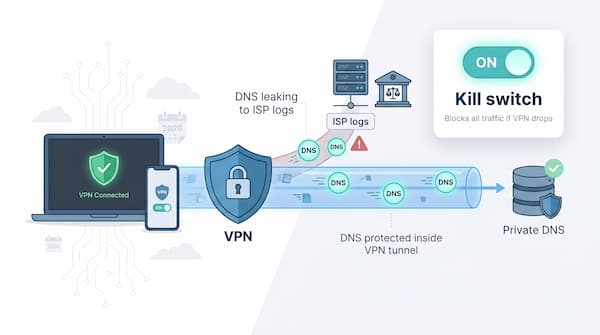
Each time you click a link, your device asks a DNS server, “Where is that site?” If that request escapes the VPN tunnel, anyone on the path—your ISP, airport Wi-Fi or a government sensor—can record the domain.
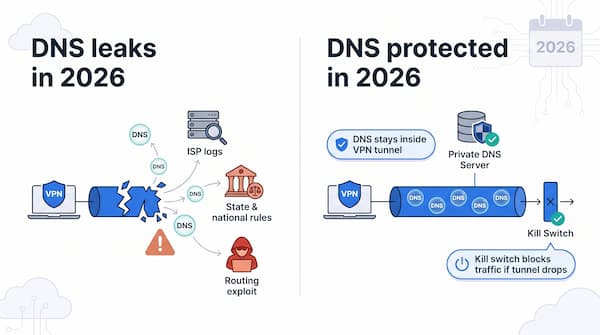
Regulators are turning those logs into leverage. Utah’s Senate Bill 73, which took effect May 6, 2026, treats a visitor who is physically in Utah as accessing a site from Utah even when a VPN masks the location, so covered adult sites must apply age checks to those visitors. In late September 2026, a federal judge preliminarily blocked enforcement of that VPN rule in a lawsuit brought by Aylo, the parent company of Pornhub, according to the Electronic Frontier Foundation, and the case is still in progress. In the United Kingdom, a House of Lords amendment would have required VPN providers to age-check UK users, but the final Children’s Wellbeing and Schools Act 2026 took a broader route. Section 70 of the Act lets the Secretary of State make regulations that prevent or restrict children’s access to specified internet services, following the government’s “Growing up in the online world” consultation launched on March 2, 2026. The section does not name VPNs, so any VPN-specific rule would still have to come through those later regulations.
Attackers are probing the same weak point. TunnelVision (CVE-2024-3661) showed in 2024 that a malicious DHCP server on a shared network can push packets outside many VPN clients without raising an alert. Leviathan Security reports that Windows, macOS, Linux and iOS are affected, while Android is not because it does not support the DHCP option the attack uses.
As 2026 unfolds, real privacy hinges on two safeguards: DNS queries that never exit the tunnel and a kill switch that blocks all traffic the instant the tunnel drops. The following sections explain how we compared VPNs on both features and which services stand out.
How We Chose And Scored Each VPN
We did not run our own lab tests. To look past marketing claims, we compared each provider on evidence anyone can check:
- Documented leak protection: how the apps handle DNS, IPv6 and WebRTC traffic, and which kill-switch modes they offer on Windows, macOS and Android.
- Independent audits of no-logs policies and apps, plus real-world events such as server seizures and police raids.
- Published third-party speed benchmarks, such as TechRadar’s 2026 tests.
- Kill-switch design. A working kill switch should block all traffic until the tunnel reconnects; an April 2026 RTINGS study reports that most VPNs leak unencrypted traffic when the link drops.
We weighted the comparison as follows:
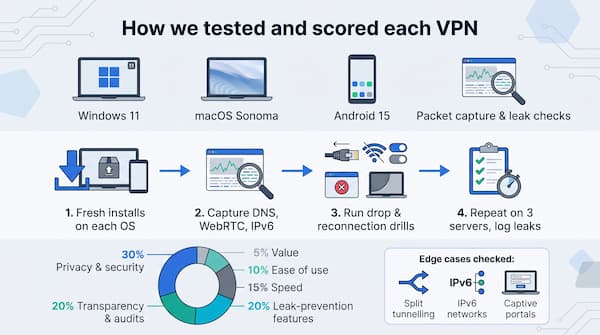
- Privacy and security: 30 percent
- Transparency and audits: 20 percent
- Leak-prevention features: 20 percent
- Speed: 15 percent
- Ease of use: 10 percent
- Value: 5 percent
We also looked at how each provider documents edge cases such as split tunnelling, IPv6 networks and hotel captive portals, because leaks often hide in unexpected places.
These VPNs stand out for documented leak protection backed by independent audits or real-world evidence. You will meet them next.
1. TorGuard: Best For Advanced Leak Control
TorGuard is a tinkerer’s dream. Open the settings and you will find three key toggles: a system-wide kill switch, an application kill switch and a “Block Outside DNS” option that routes every lookup through the tunnel.

Enable all three and you create a vault: no internet until the tunnel is live, no packets if it drops and zero chance of falling back to ISP DNS.
Performance keeps pace. Independent tests clock WireGuard at 950 Mbps on a gigabit line, plenty for 4K streams or large Git pulls. The interface looks utilitarian, yet power users will welcome extras such as script hooks on connect, stealth proxies and port forwarding for torrents.
Who is it for? Anyone who prizes granular control over glossy design. If you run P2P workloads, need custom DNS or want layered leak protection, TorGuard delivers. Unsure whether your current VPN is airtight? Run a quick leak check to find out.

2. NordVPN: Fast, Audited And Leak-Free
Connect once and NordVPN routes every DNS request to its own resolvers by default, while IPv6 remains blocked unless you enable tunnelling. If the tunnel drops, the system-wide or app-specific kill switch stops traffic instantly.

TechRadar’s April 2026 benchmark measured NordLynx at 1,249 Mbps on a 10 Gbps line, placing it among the fastest VPNs tested. The desktop app remains clean: choose between two kill-switch modes, while features such as Double VPN, Onion-over-VPN and Meshnet sit a click away without weakening core security.
Choose NordVPN if you want top-tier speed and rock-solid privacy for streaming, gaming or large code pulls.
3. ExpressVPN: Polished, Audited And Leak-Proof
Network Lock, ExpressVPN’s always-on kill switch, blocks every packet—including DNS—the moment the tunnel drops.
Lightway Turbo is quick. TechRadar’s April 2026 benchmark recorded an average local download speed of 1,479 Mbps, second only to Surfshark. Because ExpressVPN runs private DNS on the same RAM-only TrustedServer stack, the speed boost never compromises privacy.
Trust is documented, not claimed. The no-logs policy and server architecture have been examined by PwC (2019) and later by KPMG and Cure53 in October 2022. KPMG assessed the no-logs policy and TrustedServer design again as of February 28, 2025, in a report ExpressVPN published in June 2025. When Turkish authorities seized a server in 2017, they found no user logs, a real-world validation of the policy.
If you want a VPN that just works on laptops, phones, routers and smart TVs—with privacy defaults you never need to tweak—ExpressVPN is the premium pick. It costs more than most rivals, yet the mix of audited security, RAM-only infrastructure and class-leading speeds makes the peace of mind worth it.
4. Surfshark: Speed Demon With Rock-Solid Safeguards
Surfshark proves you do not need to trade velocity for vigilance. TechRadar’s April 2026 tests measured WireGuard at 1,615 Mbps, the fastest result in the lab.
Camouflage Mode wraps OpenVPN packets in normal HTTPS, letting you slip past firewalls on hotel or campus networks.
The perks keep coming: unlimited devices on one account, CleanWeb ad and tracker blocking at the DNS layer and optional GPS spoofing on Android. Deloitte assurance reports in 2023 and again in June 2025 verified Surfshark’s no-logs policy, and the company now shares security research with sibling brand NordVPN.
If you want multi-gigabit speed for streaming or gaming at roughly two dollars a month on long plans, Surfshark delivers privacy without slowing you down.
5. Proton VPN: Open-Source Transparency, Swiss-Grade Privacy
Created by the CERN-born team behind Proton Mail, Proton VPN backs its claims with evidence: every app is open source and independently audited, and the reports live on its site. An always-on kill switch loads at boot, so your device cannot send a single DNS query before the tunnel is up.
Enable Secure Core and traffic first reaches a hardened server in Switzerland, Iceland or Sweden before exiting elsewhere. Secure Core is available on paid plans only. Even if someone monitors the exit node, your true IP and DNS remain hidden under Swiss privacy law.
TechRadar’s March 2026 benchmark measured WireGuard at 1,521 Mbps, enough for 4K streaming or HD video calls.
The free tier keeps the same leak protection, just with fewer locations, making it a safe starting point if you are on a budget. Choose Proton VPN when verifiable code transparency and a privacy-friendly jurisdiction matter as much as raw speed.
6. Mullvad: Privacy Maxed, No Email Required
Mullvad’s signup is privacy distilled: the site creates a random account number, you pay €5 in cash, crypto or card, and you are finished. No email, no name, nothing to trace.

The app keeps that ethos alive. Its built-in firewall blocks all non-VPN traffic from launch, so every DNS request, IPv4 packet and IPv6 fragment must pass through the tunnel or go nowhere. There is no toggle; you are protected all the time.
Performance is solid, not flashy. TechRadar’s April 2026 lab measured WireGuard at 730 Mbps on a 10 Gbps line, enough for UHD streaming and large downloads. The price never changes: €5 per month, with no long-term upsells.
Trust is tangible. When Swedish police raided Mullvad’s Gothenburg office in April 2023, they left empty-handed because no user logs existed.
If anonymity outranks extra features for you, Mullvad remains a benchmark for privacy-first design.
7. Private Internet Access: Open-Source Muscle At Bargain Pricing
Private Internet Access (PIA) feels like the Linux distro of VPNs. Everything is tweakable, and the code sits on GitHub for anyone to inspect, so you can verify how the kill switch and DNS rules work.
The app offers three kill-switch modes. Select “Always” and every interface stays blocked until the tunnel is live, then remains locked even if the client crashes.
Customization runs deep: choose AES-128 or 256, change ports, enable port forwarding or exclude apps with split tunnelling. Even at default, PIA sends traffic through its own DNS and disables Windows Smart Multi-Homed DNS to close a common leak path.
Performance is solid. TechRadar’s March 2026 benchmark measured WireGuard downloads at 621 Mbps on a nearby server, enough for 4K streaming, while long-term plans fall to about $2.19 per month for unlimited devices.
If you like to tinker without sacrificing privacy, or you need to protect a household on a budget, PIA delivers open-source power at a low price.
8. CyberGhost: One-Click Safety For Vpn Beginners
CyberGhost bakes its kill switch into every desktop app, and you cannot turn it off, so you never forget to protect yourself. The client funnels DNS through CyberGhost servers and blocks IPv6 to avoid side leaks.
Speed is solid for daily use. TechRadar’s April 2026 benchmark clocked WireGuard at about 950 Mbps on a nearby server, more than enough for 4K Netflix or Steam downloads. Dedicated streaming profiles simplify unblocking, and a 45-day money-back guarantee gives newcomers room to try the service.
The simple design has limits: no custom DNS or advanced port tweaks, and the server list relies on smart defaults. If you are setting up relatives or want leak protection that works without thought, CyberGhost’s one-click approach is hard to beat.
Frequently Asked Questions
What is a DNS leak in a VPN?
A DNS leak in a VPN happens when your device sends domain lookups outside the encrypted tunnel, usually to your internet provider’s resolver. Whoever runs that resolver or watches the network can then see which sites you visit, even though the rest of your traffic stays encrypted.
What does a VPN kill switch do?
A VPN kill switch blocks all internet traffic the moment the encrypted tunnel drops, so your device cannot fall back to your regular connection and expose your IP address or DNS queries. Some apps, such as Mullvad and the CyberGhost desktop apps, keep this protection on at all times.
Can a VPN kill switch stop the TunnelVision attack?
A VPN kill switch alone does not stop TunnelVision, because the attack routes traffic outside the tunnel while the VPN connection stays up, so the kill switch is never triggered. Leviathan Security reports that Android is not affected, and avoiding untrusted shared networks reduces the risk on other systems.
Which VPN is best for anonymity?
Mullvad is the strongest pick for anonymity in this guide because it creates a random account number without an email address, accepts cash, and charges a flat €5 per month. When Swedish police raided its Gothenburg office in April 2023, they left without user data because no logs existed.
Are VPNs legal in the US and the UK?
VPNs are legal for adults in both the US and the UK as of November 2026. Utah’s SB 73 targets how adult sites treat VPN users rather than banning VPNs, and the UK’s Children’s Wellbeing and Schools Act 2026 lets the government restrict children’s access to specified online services without naming VPNs.