

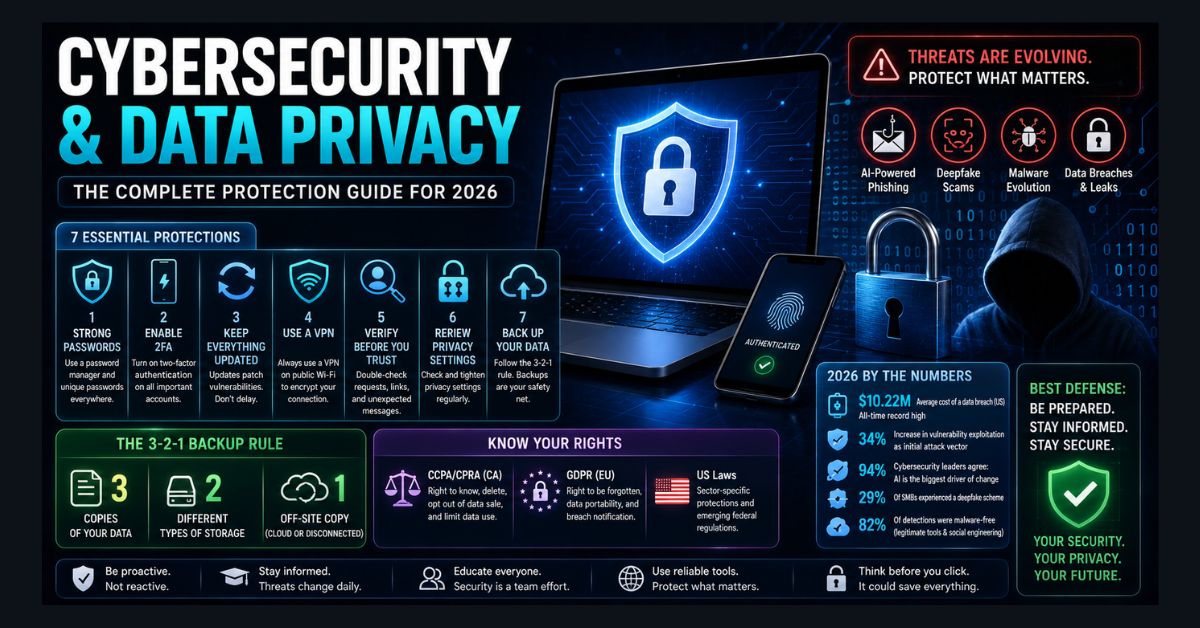
In 2026, the biggest cybersecurity and data privacy threats are AI-powered attacks: deepfake scams, AI-generated phishing, and faster vulnerability exploitation. The average US data breach now costs a record $10.22 million. The core defenses for everyone are strong unique passwords, multi-factor authentication (MFA), software updates, and verifying unexpected requests.
- Top threat: AI-powered attacks — deepfakes, smarter phishing, faster exploits
- Cost: The average US data breach hit a record $10.22 million
- Deepfakes are mainstream: 29% of small/medium businesses faced a deepfake scheme in 2026
- Best defense: Unique passwords + a password manager, and MFA everywhere
- Verify requests: Confirm any unexpected call or email asking for money or credentials
The cybersecurity landscape in 2026 looks nothing like it did two years ago. AI hasn’t just changed how we work — it has fundamentally changed how attacks are launched, how vulnerabilities are discovered, and how fast everything moves. The average data breach in the US now costs $10.22 million, an all-time record. Vulnerability exploitation as an initial attack vector jumped 34%, with edge devices and VPN infrastructure seeing exploitation rates surge from 3% to 22%. And according to the World Economic Forum, 94% of cybersecurity leaders agree that AI is the single biggest driver of change in cybersecurity this year.
This isn’t a guide written for IT professionals. It’s written for anyone who uses the internet — which means you. Whether you’re managing personal accounts, running a small business, or just trying to keep your family’s data safe, these are the threats and protections that actually matter right now.
The Threat Landscape Has Changed Fundamentally
AI-Powered Attacks Are Here
The most significant shift in 2026 is that attackers now use AI as effectively as defenders do. Experian’s 2026 Data Breach Industry Forecast identified AI as the central threat vector, with cybercriminals leveraging generative AI to create more convincing phishing emails, generate deepfake voices and video for social engineering, develop shape-shifting malware that evades detection, build synthetic identities for fraud, and automate attack chains that previously required human expertise.
The numbers confirm the trend. IBM X-Force data shows AI-generated malware and supply chain attacks have the steepest growth curves of any attack category. CrowdStrike reports that 82% of detections in 2026 were malware-free — meaning attackers are using legitimate tools and social engineering rather than traditional viruses.
We recently covered how AI models like Anthropic’s Mythos and OpenAI’s GPT-5.5-Cyber are finding software vulnerabilities at a pace that far exceeds human security researchers — Palo Alto Networks discovered 75 bugs in a single month using these tools. The same capabilities that defenders use to find bugs are available (or will soon be available) to attackers.
Deepfake Scams Are Mainstream
More than a quarter (29%) of small and medium businesses report experiencing a deepfake scheme in 2026. These aren’t crude fakes — they’re AI-generated voice calls from your “CEO” requesting wire transfers, video calls with synthetic faces impersonating colleagues, and phishing emails that perfectly mimic writing styles scraped from social media.
There was a 442% growth in vishing (voice phishing) operations between the first and second half of 2024, and the trend has accelerated into 2026. If someone calls claiming to be from your bank, your boss, or your IT department and asks for credentials or money — verify through a separate channel before acting.
The Government Data Problem
Even government agencies aren’t immune. The US government acknowledged possible misuse of Americans’ Social Security data by the DOGE team earlier this year — the DOGE Social Security data case — highlighting that data privacy threats come from institutional misuse as well as criminal hacking. And software vulnerabilities in trusted products like Microsoft Office exposed confidential emails to Copilot AI — a reminder that even the software you use daily may have security gaps.
How to Protect Yourself: The 2026 Essentials
1. Use a Password Manager (Non-Negotiable)
Stop trying to remember passwords. In 2026, the average person has 100+ online accounts. Using the same password across multiple sites — or using weak passwords you can remember — is the single biggest security vulnerability most people have.
Use a password manager (Bitwarden is free and open-source; 1Password and Dashlane are excellent paid options) to generate and store unique, complex passwords for every account. Your master password should be a long passphrase — something like “correct-horse-battery-staple” is stronger and easier to remember than “P@ssw0rd123.”
2. Enable Two-Factor Authentication Everywhere
Two-factor authentication (2FA) blocks the vast majority of account takeover attempts, even if your password is stolen. Enable it on every account that supports it — email, banking, social media, and cloud storage are the priorities. The same rule applies at work, especially when securely logging into employer portals like AT&T HR Access or any internal HR, payroll, or benefits system that contains sensitive personal data.
Use an authenticator app (Google Authenticator, Microsoft Authenticator, or Authy) rather than SMS-based 2FA. SMS codes can be intercepted through SIM-swapping attacks. Hardware security keys (YubiKey) offer the strongest protection for high-value accounts.
3. Keep Everything Updated
Software updates aren’t just about new features — they patch security vulnerabilities that attackers actively exploit. Mandiant’s M-Trends 2026 report found that nearly 28% of known vulnerabilities face active exploitation within 24 hours of public disclosure. That means the window between “patch available” and “actively being attacked” has shrunk from weeks to hours.
Enable automatic updates for your operating system (keep Windows 11 current), browsers, apps, and especially your phone. Windows users should also pay attention to deeper platform-security deadlines, including the Windows Secure Boot certificate expiration, because firmware and boot-trust issues can affect whether older systems continue receiving or applying security protections smoothly. When an update requires a restart, do it immediately — don’t postpone for days.
4. Use a VPN on Public Wi-Fi
Public Wi-Fi at cafes, airports, hotels, and libraries is fundamentally insecure. Attackers on the same network can intercept unencrypted traffic, capture login credentials, and redirect you to fake websites.
Use a VPN whenever you’re on public Wi-Fi. Our step-by-step VPN setup guide for Windows 11 covers free and paid options with specific installation instructions. Proton VPN offers a reputable free tier with no data cap.
5. Verify Before You Trust
The era of “don’t click suspicious links” has evolved into “verify everything, even if it looks legitimate.” AI-generated phishing emails are now virtually indistinguishable from real communications. Deepfake voice calls sound exactly like the person they’re impersonating.
New rules for 2026: never send money or credentials based on a phone call or email alone — verify through a separate channel (call the person back on a number you look up independently). Be skeptical of urgency — “you must act immediately” is the hallmark of social engineering. Check email sender addresses carefully — one-character differences are common in spoofed emails.
6. Review Your Privacy Settings Quarterly
Go through your privacy settings on Google (myaccount.google.com), Facebook/Meta, Apple (appleid.apple.com), and any other platforms you use. Tighten who can see your information, what data is collected, and which apps have access to your accounts.
Pay particular attention to AI features that access your data. As AI tools become more integrated into platforms like Google Workspace and Microsoft 365, your documents and emails may be processed by AI systems. Understand what’s being analyzed and opt out of features you’re not comfortable with.
7. Back Up Your Data (The 3-2-1 Rule)
Ransomware attacks hit 26% of small businesses in 2026. The best defense against ransomware is a backup that the attackers can’t encrypt. Follow the 3-2-1 rule: 3 copies of your data, on 2 different types of storage, with 1 copy off-site (cloud backup or a disconnected external drive).
Test your backups periodically by actually restoring a file. A backup you’ve never tested is a backup you can’t rely on.
Understanding Your Rights: Privacy Laws in 2026
Privacy laws have expanded significantly. The regulations most relevant to US residents:
- CCPA/CPRA (California): Gives California residents the right to know what data companies collect, request deletion, opt out of data sales, and limit use of sensitive personal information. Other states (Virginia, Colorado, Connecticut, Utah, Oregon, Texas, Montana) have enacted similar laws.
- GDPR (European Union): Applies to any company handling EU residents’ data, regardless of where the company is based. Includes the right to be forgotten, data portability, and mandatory breach notification within 72 hours.
- US Federal: No comprehensive federal privacy law exists yet, though sector-specific laws (HIPAA for health, FERPA for education, GLBA for finance) provide targeted protections. The EU AI Act is now influencing US policy discussions around AI-specific privacy protections.
For businesses that need to comply with these regulations, our data privacy management software guide covers the tools that help automate compliance, and our cybersecurity programs overview covers certification and training options.
For Businesses: The 2026 Security Checklist
If you run a business of any size, the minimum security posture in 2026 includes: endpoint protection on all devices (Windows Defender is sufficient for small businesses), employee security awareness training (53% of leaders increased training this year), multi-factor authentication for all business accounts, regular data backups with tested recovery procedures, an incident response plan (know who to call and what to do when a breach happens), third-party risk assessment (29% of breaches involve third-party attacks), and AI security policy covering what AI tools employees can use with company data.
For developer teams, understanding security-focused coding tools like Aikido and Snyk and staying current on innovative cybersecurity solutions is increasingly critical as AI-driven vulnerability discovery accelerates.
FAQ
What is the biggest cybersecurity threat in 2026?
AI-driven attacks — including AI-generated phishing, deepfake social engineering, autonomous vulnerability exploitation, and shape-shifting malware — are the fastest-growing threat category. The World Economic Forum reports that 94% of cybersecurity leaders identify AI as the biggest driver of change in the industry this year.
Do I really need a VPN?
On public Wi-Fi, yes — absolutely. At home on your own network, a VPN is optional for most people unless you want to prevent your ISP from seeing your browsing activity or access geo-restricted content. See our VPN setup guide for Windows 11 for specific recommendations.
What should I do if my data is breached?
Change passwords immediately for the affected service and any other account where you used the same password (another reason to use unique passwords everywhere). Enable 2FA if you haven’t already. Monitor your bank and credit card statements for unauthorized activity. Consider a credit freeze with the three major bureaus (Equifax, Experian, TransUnion) if sensitive financial data was exposed. Report the breach to identitytheft.gov if identity theft is suspected.
Is Windows Defender enough, or do I need paid antivirus?
For most individual users, Windows Defender provides solid baseline protection. It consistently scores well in independent testing and integrates seamlessly with Windows 11. Paid antivirus adds extra features (VPN, password manager, dark web monitoring, identity theft protection) but isn’t necessary for core malware defense. If you want no-cost alternatives before paying for a full security suite, our guide to the best free antivirus for Windows 11 compares the strongest options.
How do I know if my accounts have been compromised?
Check haveibeenpwned.com — enter your email address and it tells you which data breaches have included your credentials. If you appear in any breach, change the password for that service immediately (and everywhere else you used the same password). Enable 2FA on the affected account.