

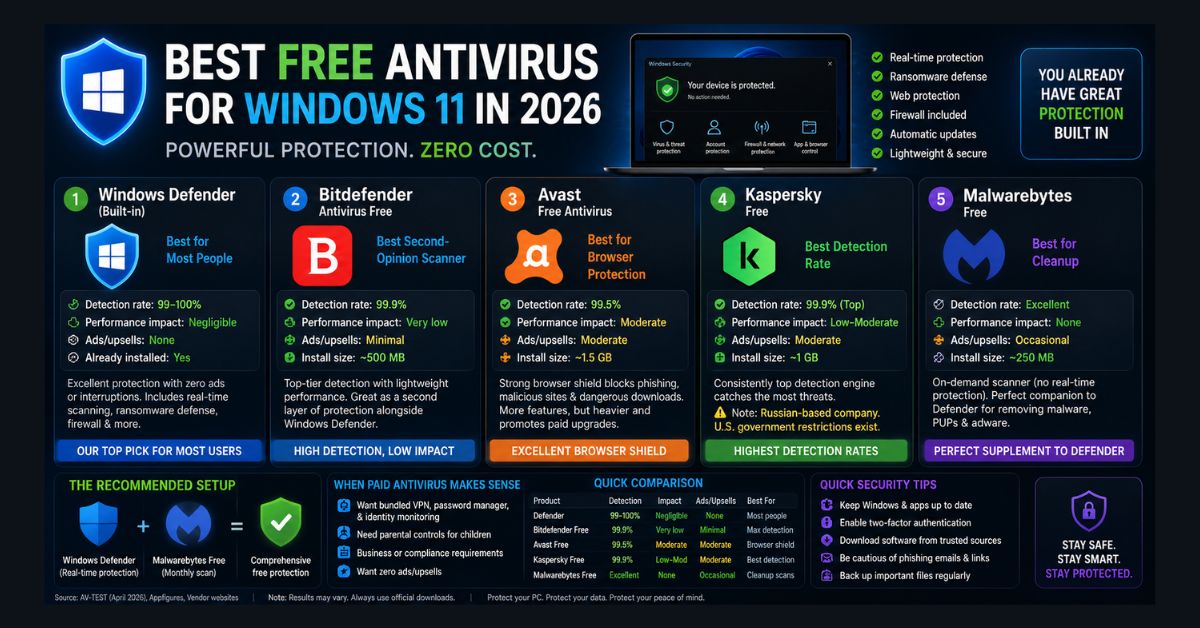
The short answer to “do I need antivirus on Windows 11?” is: you already have it. Windows Defender — built into every Windows 11 installation — is genuinely good enough for most people in 2026. It scores 99-100% in independent detection tests, includes real-time protection, ransomware defense, and firewall management, costs nothing, shows no ads, and has negligible performance impact.
But “good enough for most people” isn’t good enough for everyone. If you want a second layer of scanning, browser-specific protection, or features Defender doesn’t include (like a VPN or identity monitoring), there are legitimate free options that add value without the bloatware and upsell harassment that plagued free antivirus products for years.
We tested five free antivirus options on Windows 11, evaluating detection rates, performance impact, privacy policies, and — critically — how annoying each one is to actually live with day-to-day.
1. Windows Defender (Built-in) — Best for Most People
Detection rate: 99-100% (AV-TEST, April 2026) Performance impact: Negligible Ads/upsells: None Already installed: Yes
Windows Defender is the antivirus most people should use, because most people already are. It runs silently in the background, updates automatically through Windows Update, and scores as high as premium antivirus products in every major independent test.
What Defender includes: real-time malware scanning (files are checked when opened, downloaded, or executed), ransomware protection via Controlled Folder Access (blocks unauthorized apps from modifying your Documents, Pictures, and other folders), Windows Firewall management, secure boot verification, exploit protection, and network protection that warns about malicious websites.
What Defender doesn’t include: VPN, password manager, dark web monitoring, identity theft protection, webcam protection, or file shredder. If you need these features, you’ll need either a paid security suite or standalone tools for each.
The important point: The gap between Defender and premium antivirus has functionally closed. Ten years ago, Defender was mediocre and third-party antivirus was essential. In 2026, Defender matches or exceeds most paid products on the metric that matters most: actually catching malware.
If you use Defender, keep your system updated — Windows updates include security definition updates that keep Defender’s detection current. The AI-driven vulnerability crisis means new threats emerge faster than ever, making automatic updates critical.
2. Bitdefender Antivirus Free — Best Second-Opinion Scanner
Detection rate: 99.9% (AV-TEST) Performance impact: Very low Ads/upsells: Minimal — occasional pop-ups for the paid version Install size: ~500 MB
Bitdefender’s detection engine consistently ranks at the very top of independent testing — marginally above Defender in some evaluations. The free version includes real-time protection, web attack prevention, anti-phishing, and anti-fraud filtering.
The real value of Bitdefender Free is as a second-opinion scanner alongside Defender. While running two real-time antivirus programs simultaneously is generally a bad idea (they conflict), Bitdefender Free is lightweight enough that the overlap rarely causes problems. If something gets past Defender, Bitdefender is the most likely to catch it.
The downside: occasional pop-up notifications promoting the paid version. They’re not aggressive, but they exist. If zero interruptions is your requirement, stick with Defender alone.
Best for: Users who want maximum detection coverage and don’t mind the occasional upsell notification.
3. Avast Free Antivirus — Best for Browser Protection
Detection rate: 99.5% (AV-TEST) Performance impact: Moderate (200-300 MB RAM) Ads/upsells: Moderate — promotes paid features regularly Install size: ~1.5 GB
Avast’s strength is its dedicated browser shield — a layer of protection that operates specifically inside your web browser, scanning downloads in real-time, blocking phishing sites before they load, checking HTTPS certificates for man-in-the-middle attacks, and warning about known malicious URLs.
Defender has basic web protection through Microsoft Edge’s SmartScreen filter, but Avast’s browser shield works across Chrome, Firefox, and Edge with more aggressive scanning. For users who spend most of their time in a browser (which is most users in 2026), this dedicated browser layer catches threats that system-level antivirus sometimes misses.
The downsides: Avast is heavier than Defender or Bitdefender — it uses 200-300 MB of RAM and can noticeably slow startup on older machines. The upsell notifications are more frequent than Bitdefender’s. And Avast faced a privacy scandal in 2020 (selling user browsing data), which they’ve since stopped — but the trust damage lingers.
Best for: Users who want strong browser-specific protection and are willing to tolerate periodic paid-version promotions.
4. Kaspersky Free — Best Detection Rate
Detection rate: 99.9% (AV-TEST — consistently top-scoring) Performance impact: Low to moderate Ads/upsells: Moderate Install size: ~1 GB
Kaspersky’s free tier consistently achieves the highest detection rates in independent testing — it’s the most likely product on this list to catch a brand-new, previously unseen malware sample. The free version includes real-time protection, web filtering, email scanning, and automatic updates.
The elephant in the room: Kaspersky is a Russian-based company, and in 2024 the U.S. government banned sales of Kaspersky products to new customers, citing national security concerns about potential Russian government influence. Existing users can continue using it, and independent security researchers have not found evidence of actual data exfiltration — but the geopolitical risk is real and acknowledged.
If you’re comfortable with the geopolitical context, Kaspersky Free offers the strongest detection engine available at no cost. If you’re not comfortable with it — which is a completely reasonable position — Bitdefender Free offers nearly identical detection rates without the geopolitical baggage.
Best for: Users who prioritize maximum detection above all other considerations, including geopolitical risk.
5. Malwarebytes Free — Best for Cleanup (Not Real-Time)
Detection rate: Excellent for adware/PUPs, good for malware Performance impact: None (no background processes on free tier) Ads/upsells: Occasional prompts to upgrade Install size: ~250 MB
Malwarebytes Free is fundamentally different from the other tools on this list: it does not include real-time protection. The free version is an on-demand scanner — you run it manually when you suspect a problem, it finds and removes threats, and then it sits idle until you run it again.
This makes it the perfect companion to Windows Defender. Defender handles real-time protection 24/7. Malwarebytes handles periodic deep cleans, catching adware, PUPs (potentially unwanted programs), browser hijackers, toolbars, and other junk that Defender sometimes classifies as “not technically malware” and ignores.
Run Malwarebytes once a month — or immediately whenever you notice suspicious behavior — as a supplementary cleanup tool. Because it has no real-time component, it doesn’t conflict with Defender or any other antivirus.
For a detailed walkthrough of using Malwarebytes alongside Defender to remove an active infection, see our full malware removal guide.
Best for: Everyone. It’s the one tool on this list that genuinely complements Defender rather than competing with it.
The Recommended Setup for Most People
Defender (always on, real-time) + Malwarebytes Free (monthly scan) = comprehensive free protection. This combination covers 99.9% of threats, uses minimal system resources, generates zero annoying pop-ups, and costs nothing. It’s what most cybersecurity professionals actually use on their personal machines.
If you want a third layer, add Bitdefender Free for its marginally higher detection rate. But for most home users, Defender + Malwarebytes is the sweet spot of protection vs. simplicity.
Do You Need Paid Antivirus in 2026?
For most home users: no. The free tools above provide excellent protection. Paid antivirus ($30-80/year) makes sense if you want a bundled VPN, password manager, and identity monitoring in one subscription (this is the actual value proposition of premium suites), if you have children who download aggressively and need parental controls, if you run a small business with compliance requirements that mandate commercial antivirus, or if you want zero pop-ups or upsells — paid tiers eliminate all promotional notifications.
For comprehensive security beyond antivirus — including VPN setup, password management, two-factor authentication, and data privacy tools — see our cybersecurity and data privacy guide and our data privacy management tools review.
If your PC has been running slowly and you’re not sure if the cause is malware or general performance issues, our laptop speed guide can help you diagnose the root cause before installing additional security software.
FAQ
1. Is Windows Defender really free? No hidden costs?
Completely free. It’s built into Windows 11 and requires no subscription, registration, or payment. Microsoft doesn’t offer a premium consumer tier of Defender — the free version IS the only version. Microsoft makes its money from Windows licenses and Microsoft 365 subscriptions, not from antivirus upsells.
2. Can I run two antivirus programs simultaneously?
Running two real-time antivirus programs causes conflicts — they fight over file access, flag each other as threats, and degrade performance. The exception is Malwarebytes Free (on-demand only, no real-time component), which is specifically designed to run alongside any other antivirus. For maximum coverage: Defender (real-time) + Malwarebytes Free (periodic scan).
3. Does free antivirus slow down my PC?
Windows Defender has negligible performance impact — you won’t notice it running. Third-party options vary: Bitdefender Free is very light, Avast uses 200-300 MB of RAM and can slow startup, and Kaspersky falls in between. If performance is your top concern, stick with Defender — it’s the lightest real-time option available.
4. What about Norton, McAfee, and AVG?
Norton and McAfee are paid-only in 2026 (free trials, not genuinely free products). AVG is owned by Avast and uses the same engine — choose Avast if you want that detection technology. None of the paid products detect significantly more malware than Defender — the premium price buys convenience features, not better core protection.
5. How often should I scan my PC?
With real-time protection enabled (Defender or any other real-time antivirus), manual full scans are less critical — threats are caught on access. Run a supplementary Malwarebytes scan once a month, or immediately if you notice suspicious behavior. A full Defender scan is useful after installing software from unfamiliar sources or if your PC starts behaving unusually.