

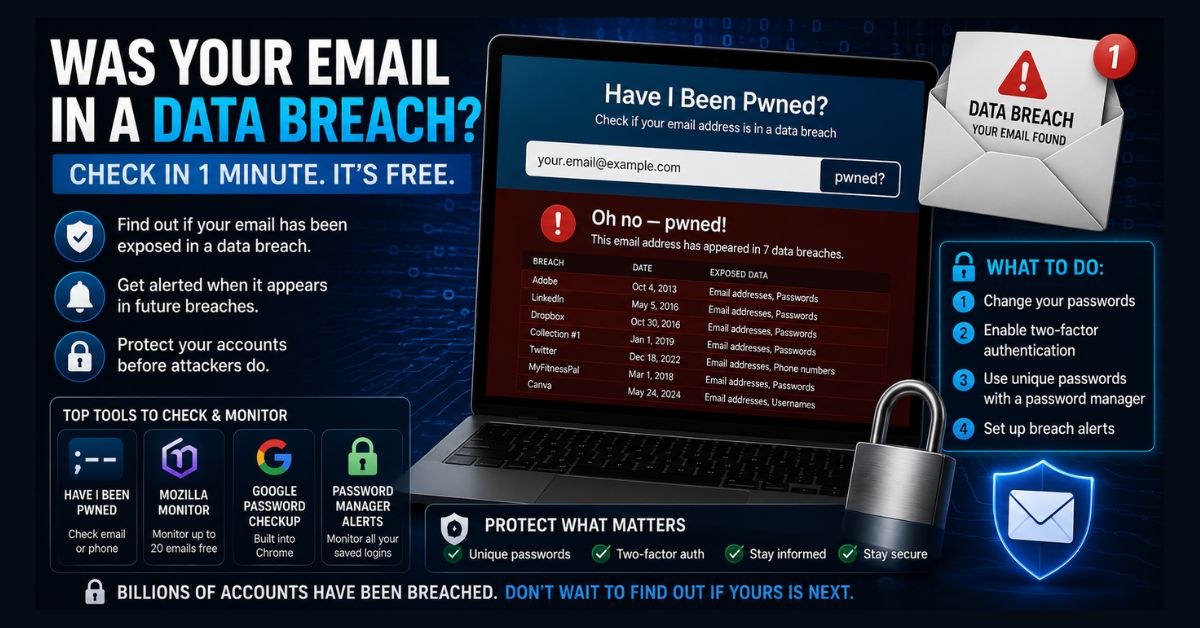
To check if your email was in a data breach, go to haveibeenpwned.com, enter your email address, and click pwned?. The free tool instantly searches billions of leaked records and shows which breaches exposed your data. If you’ve been breached, change that account’s password immediately, turn on two-factor authentication, and set up free breach alerts.
- Best free tool: Have I Been Pwned (HIBP) — billions of records, run by Troy Hunt
- Takes under a minute: Enter your email, view exposed breaches and data types
- Set up alerts: HIBP and Mozilla Monitor warn you about future breaches free
- If breached: Change the password, enable 2FA, and update any reused passwords
- Your search is private: HIBP uses anonymization and doesn’t store your address
Your email address is the key to most of your online life, which is exactly why it’s so valuable to attackers when a company gets hacked. The good news: checking whether your email has been caught in a data breach takes less than a minute and is completely free. This guide shows you exactly how to check using trusted tools, how to read the results, and, most importantly, what to do if your email turns up in a breach.
Here’s a sobering reality first: if you’ve used the same email for a few years, it has very likely appeared in at least one breach. That’s not cause for panic, billions of addresses have been exposed, but it is a reason to check, understand what was leaked, and lock down anything at risk.
How to check if your email was in a data breach
The fastest, most trusted way is Have I Been Pwned (HIBP), a free service maintained by security researcher Troy Hunt and operated in partnership with the FBI. It holds billions of records from hundreds of disclosed breaches. Here’s how to use it:
- Step 1 — Go to the official site. Visit haveibeenpwned.com directly (type it yourself to avoid lookalike sites).
- Step 2 — Enter your email. Type your address in the search box and click pwned?
- Step 3 — Read your result. You’ll get one of two answers: “Good news — no pwnage found,” or “Oh no — pwned!” with a list of the breaches your email appeared in.
- Step 4 — Review the breaches. For each one, HIBP shows the company, the date, and exactly what data was exposed (passwords, phone numbers, addresses, and so on).
- Step 5 — Check your other emails and phone number. Repeat for every email address you use, and note that HIBP can check phone numbers too.
One reassurance about privacy: HIBP protects your search using a technique called k-anonymity, and if you only search (without subscribing to alerts) it doesn’t store your address. Your check itself doesn’t expose you to any new risk.
What free tools can check for breaches?
HIBP is the gold standard, but a few other free tools are worth knowing, especially for ongoing monitoring rather than one-time checks. Here’s how the main options compare:
| Tool | Best for | Notes |
| Have I Been Pwned | One-time checks + free alerts | Most comprehensive; checks email and phone; run by Troy Hunt |
| Mozilla Monitor | Ongoing monitoring of multiple emails | Built on HIBP data; scan up to 20 emails free with a Mozilla account |
| Google Password Checkup | Chrome/Google users | Flags breached and reused saved passwords automatically |
| Password manager alerts | Existing 1Password/Bitwarden users | Watchtower / breach reports monitor all saved logins at once |
Mozilla Monitor deserves a special mention: it uses the same HIBP database but adds a dashboard and automatic alerts, and lets you monitor several addresses at once. If you use Chrome and save passwords to your Google account, Password Checkup is built in and flags compromised logins automatically. And if you use a password manager, its built-in breach monitor gives you a single view across every account, far easier than checking one email at a time. Choosing one of these for passive monitoring is one of the highest-value two-minute security tasks you can do.
How do I read and understand the results?
If you’re “pwned,” don’t panic, focus on the details. For each breach, look at three things: which service was breached (so you know which account to secure), when it happened, and what data was exposed. The last point matters most. A leaked newsletter signup with just your email is low-risk; a breach that exposed passwords, security questions, or financial details is serious and needs immediate action.
Pay special attention to breaches that exposed passwords. Because so many people reuse passwords, attackers take credentials leaked from one site and try them on others, a tactic called credential stuffing. That’s why a single old breach can put many of your accounts at risk, and why the response below focuses on passwords first.
What should you do if your email was breached?
Found in a breach? Work through these steps, starting with the most exposed accounts:
- Change the password on the breached account immediately, and make it strong and unique.
- Change that password anywhere else you reused it, this is critical, since reused passwords are how one breach becomes many.
- Turn on two-factor authentication (2FA) on the affected account and your important accounts (email, banking, social). Even if your password leaks, 2FA blocks most account takeovers.
- Use a password manager to generate and store unique passwords for every site, it also flags reused and compromised ones automatically.
- Watch for phishing. Breached data is used to craft convincing scam emails, so be skeptical of unexpected messages referencing your real details.
- Set up breach alerts so you’re notified automatically next time (see below).
For breaches that exposed financial information or your Social Security number, take extra steps: monitor your bank and card statements, consider a credit freeze, and use the U.S. Federal Trade Commission’s official identity-theft recovery resources for a step-by-step plan. Strengthening your overall setup helps too, our guides to cybersecurity and data privacy, removing malware from Windows (since infostealer malware is a common breach source), and using a reliable VPN all reduce your exposure.
How do I set up alerts for future breaches?
Checking once is good; getting warned automatically is better. On HIBP, click “Notify me when I get pwned,” enter your email, and you’ll get a free notification every time your address appears in a newly indexed breach. Mozilla Monitor offers the same automatic alerting across multiple addresses. Since new breaches are added regularly, this passive monitoring means you’ll know within days, not months, the next time your data leaks, no repeated manual checks required.
It’s worth understanding one limitation: breach checkers index leaks after they’re publicly disclosed, which can lag live dark-web activity by weeks. They’re excellent for known breaches, but no free tool sees everything instantly. That’s why the layered approach, alerts plus unique passwords plus 2FA, matters more than any single check.
The bottom line
Checking whether your email was in a data breach is one of the simplest, most valuable security habits you can build. Run your addresses through Have I Been Pwned today, act on anything serious by changing passwords and enabling 2FA, and switch on free alerts so the tool does the watching for you. Breaches are a fact of online life, but with a two-minute check and a few good habits, a leaked email doesn’t have to become a compromised account. For broader protection, pair this with strong antivirus and sensible data-privacy practices, and you’ll be ahead of the vast majority of users.
FAQ
Is Have I Been Pwned safe and legitimate?
Yes. Have I Been Pwned is a trusted, free service created by security researcher Troy Hunt and operated in partnership with the FBI. It’s widely used by security professionals. It protects your privacy using anonymization techniques, and simply searching your email doesn’t store your address or expose you to new risk.
What does it mean if my email was “pwned”?
Being “pwned” means your email address appeared in one or more known data breaches, where a company you had an account with was hacked and its data leaked. It doesn’t necessarily mean your current passwords are compromised, but you should check what data was exposed and secure any affected accounts.
Is it free to check if my email was in a data breach?
Yes. Have I Been Pwned, Mozilla Monitor, and Google Password Checkup are all free. HIBP and Mozilla Monitor also offer free alerts that notify you automatically whenever your email appears in a future breach, with no subscription required.
What should I do first if my email was breached?
Change the password on the breached account immediately, and change it anywhere else you reused that password. Then enable two-factor authentication on your important accounts. These two steps block the most common form of account takeover that follows a breach.
How often should I check if my email was breached?
Instead of checking manually, set up free breach alerts on Have I Been Pwned or Mozilla Monitor once, and they’ll notify you automatically whenever your email appears in a new breach. It’s worth doing a manual check every few months as well, especially after hearing about a major breach.