

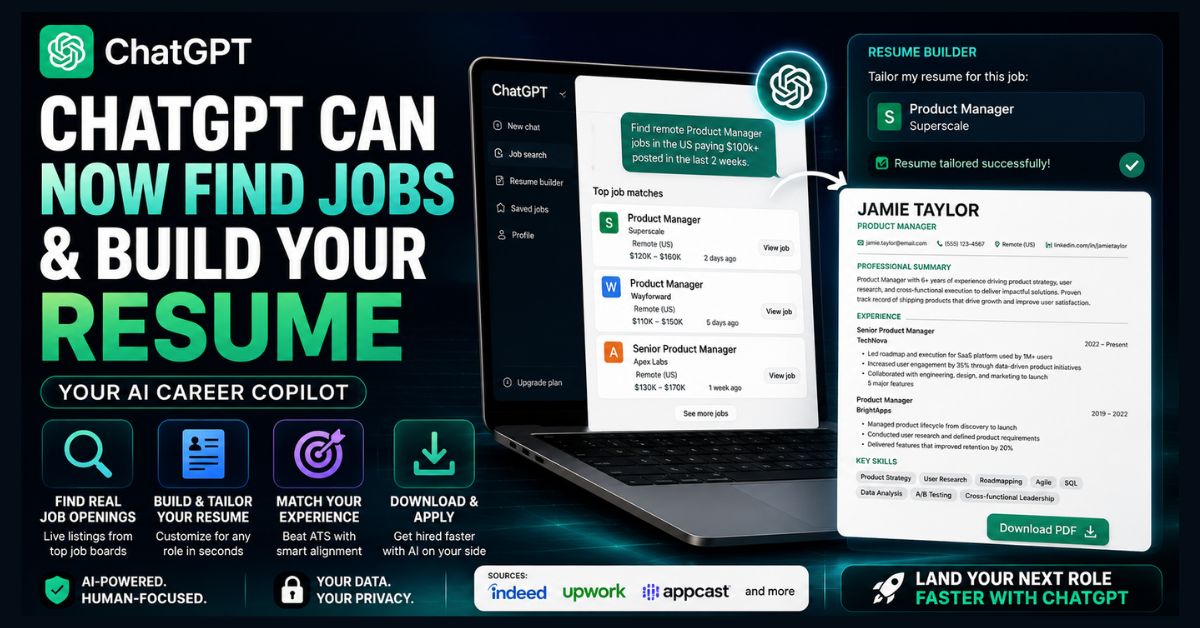
ChatGPT can now find jobs and build your resume. As of June 2026, it pulls live job and freelance listings from Indeed, Upwork, Appcast, and the web, matches them to your background, and lets you build, tailor, and download a polished resume, all in one chat. Job search is US-only; the resume tool is worldwide in English.
- Live listings: Pulls real jobs from Indeed, Upwork, Appcast, and the web
- Resume builder: Create, tailor, and download a formatted resume in-chat
- Free to use: Available on Free, Go, Plus, and Pro plans
- Availability: Job search US-only; resume tool worldwide (English, web)
- You still apply on the original job site, not inside ChatGPT
OpenAI has quietly turned ChatGPT into a job-search engine and resume builder. As of early June 2026, you can ask ChatGPT to find real, current openings, have it match them to your experience, then build and download a tailored resume without ever leaving the chat. It collapses the old, tab-juggling job hunt into a single conversation. Here’s exactly what the new tool does, how to use it well, and the mistakes that will still get your application auto-rejected.
For years, using ChatGPT for a job hunt meant a clumsy loop: copy a posting, paste it in, ask for a tailored resume, copy it back out, switch to Indeed, search, repeat. That loop is mostly gone. The question now is whether ChatGPT is good enough to be your primary job-search tool, or just a faster version of the old grind.
What does ChatGPT’s new job search tool do?
ChatGPT’s career update has two parts working together. First, live job search: ChatGPT surfaces real, current job and freelance listings pulled from sources like Indeed, Upwork, Appcast, and across the open web, then personalizes them based on your stated experience, skills, and goals. Second, an upgraded resume builder: you can upload an existing resume or create one from scratch, tailor it to a specific posting, and download it in a clean, professional format.
The two features chain naturally. Ask ChatGPT to find roles, pick one it surfaces, then ask it to tailor your resume to that exact job, all in the same conversation. According to OpenAI’s own documentation, applications still happen on the original source site, you don’t apply from inside ChatGPT.
This is the official OpenAI Help Center release-notes page, and it includes the June 1, 2026 job-search and resume-formatting update.
Who can use it, and is it free?
The rollout is staged by feature and region. The job search feature is initially US-only, available across the Free, Go, Plus, and Pro plans. The resume tool is available worldwide in English through the web version on all plans. So even outside the US, you can use the resume builder today, even if live job matching hasn’t reached you yet.
Because it works on the free tier, this is one of the more accessible AI job tools available, no subscription required to try it. If you’re weighing whether to pay for more capability, our Claude vs ChatGPT vs Gemini comparison and best free ChatGPT alternatives cover how the assistants stack up beyond job hunting.
How to use ChatGPT for your job search: a simple routine
Here’s a practical, repeatable session that takes about 15 minutes:
- Step 1 — Set your context. Tell ChatGPT your target role, location, seniority, must-haves (salary, remote, industry), and paste your current resume or a summary of your experience. Specific inputs produce specific results; vague prompts produce generic ones.
- Step 2 — Ask it to find roles. Request live listings that fit your criteria, for example, “Find remote mid-level UX designer roles in the US paying $90k+, posted in the last two weeks.” Review what it surfaces and ask it to refine or filter.
- Step 3 — Stress-test a posting against your resume. Pick one real listing, paste the job description, and ask ChatGPT to identify missing keywords and rate how well your resume matches. This is where the applicant tracking system (ATS) battle is won or lost.
- Step 4 — Tailor and download. Have ChatGPT rewrite your bullet points to align with the role’s language while keeping every claim honest, then download the formatted version. Keep a clean “master resume” and generate a tailored copy per application.
- Step 5 — Apply on the source site and track your responses. For sharper prompting throughout, our guide to ChatGPT prompts for work has templates you can adapt, and students and recent grads can pair this with our best AI tools for students.
What are the limits and risks?
This is the part most write-ups skip, and it matters. Three honest caveats:
The listings can be shallow or stale. Aggregated job feeds sometimes surface duplicate, expired, or thinly-described roles. Treat ChatGPT’s matches as a starting shortlist, not a complete picture of the market, and still check the major job boards directly.
AI-screening cuts both ways. Many employers now use AI to screen resumes, so an AI-tailored resume is entering an AI-filtered pipeline. Keyword alignment helps you pass ATS parsing, but never let ChatGPT invent experience, fabricated or exaggerated claims are the fastest route to rejection (or worse, a withdrawn offer). Use it as an editor, not a fiction writer.
Privacy. You’re sharing your full work history, and potentially personal contact details, with an AI system. That’s a reasonable trade for many, but worth a conscious choice. If ChatGPT misbehaves mid-session, our guide to fixing ChatGPT errors covers the common glitches.
Why this matters in the 2026 job market
The timing is pointed. The tech labor market has been turbulent, with significant layoffs across 2026 and a notable shift in computer science enrollment as AI reshapes entry-level work. In that environment, anything that makes job searching faster and applications sharper has real value, especially for the many candidates competing for fewer openings.
There’s also irony worth noting: AI is simultaneously blamed for disrupting jobs and now positioned as the tool to help you find one. For broader US labor-market context as you plan a search, the official jobs data is the best primary source.
This is the official BLS data portal, so it is the strongest authority link for labor-market context.
The bottom line: ChatGPT’s job tools are a genuine convenience upgrade, not a magic button. The candidates who win still bring real skills, honest resumes, and human follow-through, ChatGPT just removes the busywork around them. Used as a tactical assistant rather than a shortcut, it’s one of the more practically useful AI features to launch this year.
FAQ
Can ChatGPT really find live job listings now?
Yes. As of June 2026, ChatGPT pulls live job and freelance listings from sources like Indeed, Upwork, Appcast, and the web, then personalizes them to your experience and goals. You review the matches in chat, but you apply on the original source site. The job search feature is initially US-only.
Is ChatGPT’s job search and resume feature free?
The job search feature is available on Free, Go, Plus, and Pro plans in the US. The resume builder is available worldwide in English on the web across all plans, including free. No subscription is required to try either feature.
Can ChatGPT build and download a resume?
Yes. You can upload an existing resume or create one from scratch, ask ChatGPT to tailor it to a specific job, and download it in a polished, professional format. Keep a clean master resume and generate a tailored version for each role.
Will an AI-written resume get rejected by ATS systems?
Not inherently. ChatGPT can actually improve your applicant tracking system (ATS) match by aligning keywords with the job description. The risk is fabrication, never let it invent experience. Keep every claim honest and use it to strengthen and align real achievements, not manufacture them.
Is it safe to share my resume with ChatGPT?
Using the resume tool means sharing your work history and possibly contact details with OpenAI’s system. For most users this is a reasonable trade-off, but it’s worth a conscious decision. Avoid pasting highly sensitive personal data, and review OpenAI’s privacy terms if you have concerns.