

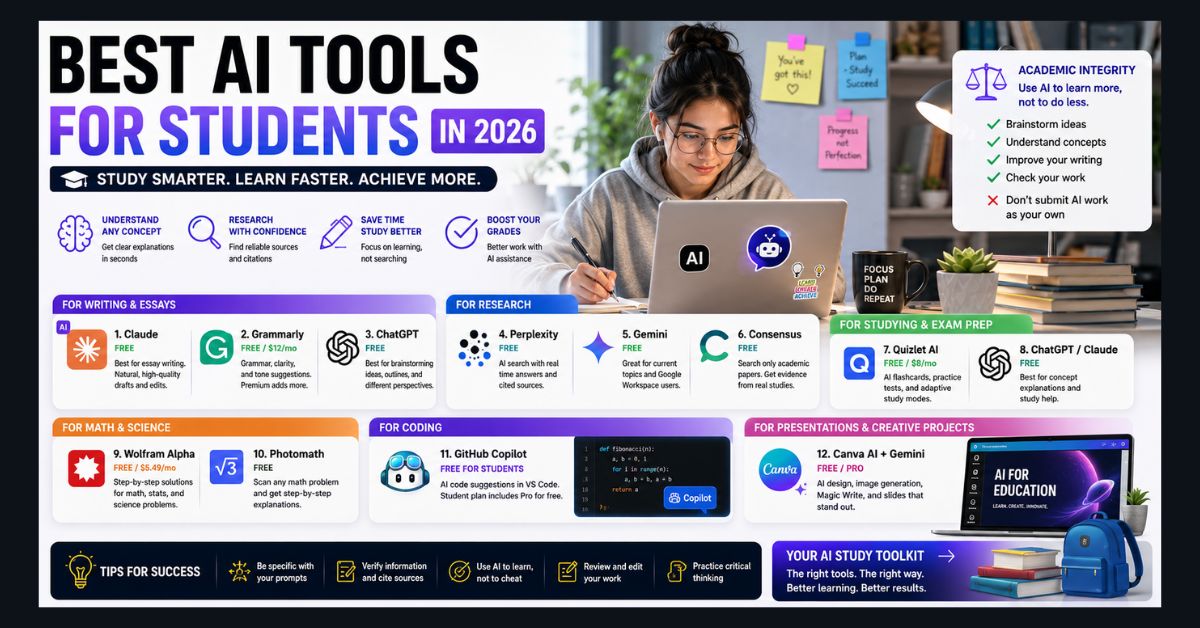
The best AI tools for students in 2026 include Claude for essay writing, Perplexity for cited research, Gemini for current topics, and Grammarly for editing. Most offer strong free tiers, so students can cover writing, research, and study help without paying.
- Best for essays: Claude (free tier) — natural-sounding drafting and feedback
- Best for research: Perplexity — sourced answers with inline citations
- Best for current topics: Google Gemini — native Search integration
- Best for editing: Grammarly — free tier covers the essentials
- Smart use: Use AI to learn faster, not to replace the learning itself
AI tools have gone from “that’s cheating” to “that’s how you study” in under two years. In 2026, students who use AI effectively aren’t cutting corners — they’re learning faster, understanding concepts more deeply, and producing better work than they could alone. The trick is knowing which tools to use for what, and understanding the line between AI-assisted learning and AI-replacing-learning.
We tested every major AI tool through a student’s lens — writing essays, studying for exams, research, math homework, coding assignments, and building presentations. Here are the 12 that actually deliver, organized by use case.
For Writing and Essays
1. Claude (Free tier) — Best for Essay Writing
Claude produces some of the most natural-sounding AI writing, which makes it useful for feedback on structure and flow. Its free tier runs on Anthropic’s Claude Sonnet models, with usage limits that reset on a rolling five-hour window, which is enough for most essay drafting, editing, and brainstorming sessions. Ask Claude to “help me outline an argumentative essay about renewable energy policy” or “improve the flow of this paragraph” — don’t ask it to write your essay for you.
2. Grammarly (Free) — Best for Editing
Grammarly catches grammar, spelling, and clarity issues that spell-check misses. The free tier handles the essentials. The Pro plan costs about $12/month when billed annually (as of October 2026; confirm on Grammarly’s plans page) and adds tone adjustment, plagiarism checking, AI-text detection, and full-sentence rewrites. Grammarly does not list a separate student price for individuals; its education discounts are offered to institutions.
3. ChatGPT (Free tier) — Best for Brainstorming
ChatGPT’s conversational format makes it excellent for brainstorming. “Give me 5 different angles I could take on a paper about the ethics of gene editing” generates starting points you might not have considered. As of October 2026, free ChatGPT users get OpenAI’s GPT-5.6 Luna model by default, and the $20/month Plus plan adds the more capable GPT-5.6 Sol model along with higher usage limits. Students using ChatGPT beyond coursework can also use ChatGPT to find a job and build a resume when applying for internships, part-time work, or entry-level roles.
For Research
4. Perplexity AI (Free) — Best for Cited Research
Perplexity provides sourced answers with inline citations, making it the most academically useful research AI. Every claim links to the source, so you can verify information and build your bibliography simultaneously. The free tier handles most student research needs.
5. Google Gemini (Free) — Best for Current Topics
Gemini’s native Google Search integration makes it the strongest choice for research on current events, recent studies, and evolving topics. It’s also integrated with Google Docs and Slides, which most students already use.
Eligible US college students can also get one year of Google AI Pro at no cost (normally $19.99/month) if they redeem the offer by December 31, 2026, according to Google’s student offer announcement. The plan raises Gemini usage limits and adds Gemini in Gmail and Docs, but a valid payment method is required at sign-up, and the subscription renews at $19.99/month unless you cancel before the free year ends.
6. Consensus (Free) — Best for Academic Papers
Consensus searches only peer-reviewed academic papers. Ask it a research question and it returns findings from published studies, not blog posts or opinion pieces. Essential for anyone writing research papers or literature reviews.
For Studying and Exam Prep
7. Quizlet AI (Free/Premium) — Best for Flashcards
Quizlet’s AI generates flashcard sets from your notes, textbook chapters, or any pasted content. It creates questions, explains wrong answers, and adapts difficulty based on your performance. The free tier is generous; premium ($8/month) removes ads and adds advanced AI features. For students managing multiple subscriptions, it is worth tracking which services still offer meaningful discounts — including Spotify’s discounted student plan — so your monthly study and entertainment stack does not get out of hand.
8. ChatGPT or Claude — Best for Concept Explanation
When a textbook explanation doesn’t click, ask AI: “Explain [concept] like I’m a high school junior who understands [related concept] but not [this one].” AI is the world’s most patient tutor — it never gets frustrated when you ask the same question five different ways.
For Math and Science
9. Wolfram Alpha (Free/Pro) — Best for Math
Wolfram Alpha solves math problems step by step — from algebra to differential equations — showing complete work at each stage. The free version handles individual problems; Pro ($5.49/month for students) provides extended step-by-step solutions and practice problems.
10. Photomath (Free) — Best for Homework Help
Point your phone camera at a math problem, and Photomath shows the solution with step-by-step explanation. It covers arithmetic through calculus. Use it to understand how to solve problems, not just to copy answers.
For Coding
11. GitHub Copilot (Free for students) — Best for Coding Assignments
GitHub offers Copilot free to verified students through GitHub Education. Since March 12, 2026, that access runs under a dedicated GitHub Copilot Student plan, which includes unlimited code completions inside editors such as VS Code and, since June 1, 2026, 200 GitHub AI Credits per month for chat and agent features, according to GitHub’s student plan announcement. The main limitation is model choice: students cannot manually select premium models such as Claude Opus or GPT-5.4, because Copilot’s Auto mode picks the model for each task. For a full guide on getting started, see our how to use AI to write code beginner’s guide. The CS field is changing rapidly, and knowing how to work with AI coding tools is becoming an essential skill.
For Presentations and Creative Projects
12. Canva AI + Gemini — Best for Visual Projects
Canva’s AI features (image generation, design suggestions, Magic Write) combined with Gemini’s ability to generate images directly in Google Slides cover most student presentation needs. Students who need full slide decks, pitch-style layouts, or faster presentation workflows can also compare dedicated AI presentation makers built specifically for turning prompts into polished slides. For image-heavy projects, see our best free AI image generators guide. For video assignments, check our AI video generators roundup.
The Academic Integrity Line
Using AI tools effectively while maintaining academic integrity comes down to one principle: use AI to learn more, not to work less.
Appropriate uses: brainstorming ideas, getting feedback on your writing, understanding concepts you’re struggling with, generating study materials, debugging code you wrote, and checking grammar.
Inappropriate uses: submitting AI-generated text as your own work, having AI write entire papers or assignments, using AI to take tests or exams, and copying AI-generated code without understanding it.
Most universities have updated their AI policies for 2026. Check your institution’s specific guidelines — many now explicitly allow AI as a study aid while prohibiting submitting AI-generated work as your own. When in doubt, cite your AI use and show your own thinking process.
For a broader comparison of which AI platform is best for different student needs, see our Claude vs ChatGPT vs Gemini comparison, or explore all free ChatGPT alternatives available in 2026.
FAQ
1. Will my professor know I used AI?
AI detection tools exist but are unreliable — they produce frequent false positives. However, sudden changes in your writing quality, style, or sophistication are obvious to experienced instructors. The better approach is to use AI as a tool (brainstorming, editing, studying) while ensuring the core work and ideas are your own.
2. Which free AI is best for students overall?
Claude’s free tier for writing quality, Perplexity for research, and Gemini for Google Workspace integration. If you can only pick one, Claude offers the most versatile free experience for academic work.
3. Is GitHub Copilot really free for students?
Yes, GitHub Copilot is free for verified students, who are placed on the Copilot Student plan with unlimited code completions and 200 AI Credits per month (as of October 2026). Apply through GitHub Education with your academic email or proof of enrollment such as a dated school ID; GitHub says the benefit can take several days to apply after verification, and the paid Copilot Pro plan otherwise costs $10/month.
4. Can I use AI for group projects?
Yes, and it’s particularly useful. Use AI to organize meeting notes, generate agendas, create project timelines, and draft shared documents. Just ensure all team members understand what was AI-assisted and review everything for accuracy.