

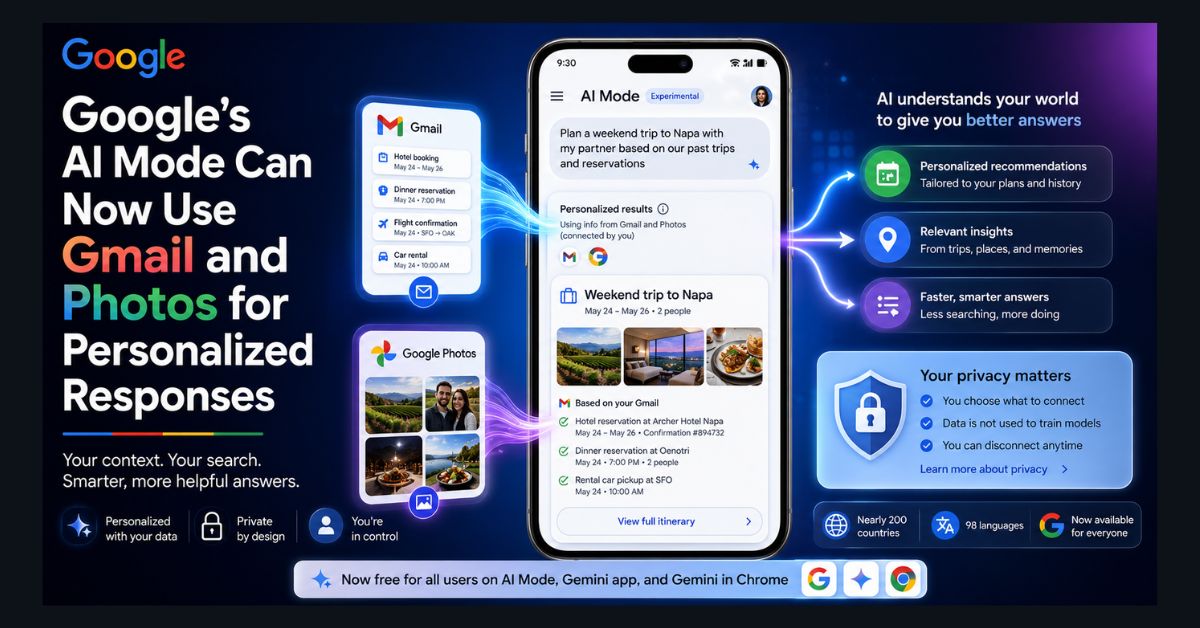
Google’s AI Mode — the conversational, chatbot-style version of Search — can now draw on your Gmail and Google Photos to give personalized, context-aware answers. The feature, called Personal Intelligence, launched in January 2026 for paid subscribers, but it has since expanded dramatically: it’s now free, available in nearly 200 countries and 98 languages, and woven across AI Mode, the Gemini app, and Gemini in Chrome. Here’s how it works, how to turn it on (or off), and the privacy trade-offs to understand before connecting your inbox to an AI.
What is Personal Intelligence?
Personal Intelligence is Google’s name for letting its AI use your own data as context. With your permission, AI Mode can reference your Gmail (bookings, receipts, plans, conversations) and Google Photos (places you’ve been, things you own, people you know) when answering questions — with Google Calendar support announced as coming soon.
The practical difference is that the AI stops being generic. Ask about planning a family trip, and it can build suggestions around the hotel confirmation already in your inbox and the destinations in your photo library. Ask about sneakers like the ones you bought last year, and it can reference the actual purchase. Instead of re-explaining your context in every prompt, the AI already has it. Under the hood, AI Mode uses Google’s “fan-out” technique — splitting your query into multiple simultaneous sub-searches — and now blends your personal context into that process.
Who can use it now?
This is where the story has changed most since launch. The rollout came in three waves:
January 22, 2026: Personal Intelligence launched in AI Mode as an opt-in Labs feature for Google AI Pro and AI Ultra subscribers in the U.S. (English only). March 17, 2026: Google expanded it to all free U.S. users with personal accounts, across AI Mode, the Gemini app, and Gemini in Chrome. May 2026 (Google I/O): Google took it global — nearly 200 countries and territories, 98 languages, no subscription required, as part of the Search overhaul announced at I/O 2026.
A few requirements still apply: you need a personal Google account (Workspace business, enterprise, and education accounts are excluded), you must be 18 or older, and certain activity settings need to be enabled. The Chrome integration initially focuses on Mac and Windows desktop.
How to turn Personal Intelligence on (or off)
The feature is opt-in — nothing is connected until you say so. To enable it: open Google Search, tap your profile picture, select Search personalization, choose Connected Content Apps, and toggle on Gmail and/or Google Photos. The rollout is gradual, so it may take a few days to appear on your account. You can disconnect either app at any time from the same menu, and the Gemini app has an equivalent Connected Apps setting.
One welcome design choice: you control each source individually, so you can connect Photos but not Gmail, or neither, or both.
What about privacy?
The obvious question, and worth answering carefully. Google states that Gemini and AI Mode do not train directly on your Gmail inbox or Google Photos library. Your personal content is used to ground responses, not absorbed into the model. However, Google does train on limited information such as your prompts and the model’s responses — so the conversations themselves aren’t entirely outside the loop.
Reasonable people land differently on this trade-off. The convenience is real, and Google’s controls (opt-in, per-app toggles, anytime disconnection) are genuinely better than many AI data integrations. But connecting your inbox — receipts, medical appointments, travel plans, personal conversations — to an AI system is a meaningful expansion of what that system knows about you, and Google’s April 2026 step of using “actual images of you and your loved ones” from Photos to guide AI image generation showed how quickly the aperture can widen. If you’re privacy-conscious, our guides to cybersecurity and data privacy and data privacy management software cover the broader principles for deciding what to connect to what.
A sensible middle path: try it with Photos only, see if the personalization is worth it to you, and connect Gmail later (or never).
How does it compare to Siri, Copilot, and ChatGPT?
Personal Intelligence is currently the most aggressive personal-context play among the big assistants — no rival combines this breadth of personal data access for free users. Apple’s Siri personalization has been repeatedly delayed (and Apple has now rebuilt Siri on Google’s own Gemini models, in a twist). Microsoft Copilot reaches into Microsoft 365 data mainly for enterprise accounts, and ChatGPT’s memory feature stores conversational context rather than connecting to your inbox or photo library.
That makes Google’s ecosystem advantage explicit: it already hosts your email, photos, calendar, and browsing, so its AI gets a context head start rivals can’t easily match. It’s the same integration story playing out across Gemini in Docs, Sheets, and Slides — and a key factor in how the assistants stack up in our Claude vs ChatGPT vs Gemini comparison. If you’re getting started with Gemini’s productivity side, our hands-on Workspace guide is the practical companion.
The bottom line
Personal Intelligence is the clearest signal yet of where Google thinks search is going: away from one-size-fits-all results and toward an AI that knows your context without being told. In under five months it went from a U.S. paid-tier experiment to a free global feature — fast even by Google’s standards. Whether you embrace it comes down to a personal calculation: the convenience of an assistant that already knows your plans, versus the comfort of keeping your inbox to yourself. The good news is the choice — for now — is genuinely yours, one toggle at a time.
FAQ
1. What is Personal Intelligence in Google AI Mode?
Personal Intelligence is an opt-in feature that lets Google’s AI Mode, the Gemini app, and Gemini in Chrome use your Gmail and Google Photos as context for personalized answers — for example, building travel suggestions around bookings in your inbox. Google Calendar support is coming soon.
2. Is Personal Intelligence free?
Yes. It launched in January 2026 for Google AI Pro and Ultra subscribers, expanded to all free U.S. users in March, and went global at Google I/O 2026 — now available in nearly 200 countries and 98 languages with no subscription required, on personal Google accounts.
3. How do I turn Personal Intelligence on or off?
In Google Search, tap your profile picture, go to Search personalization, then Connected Content Apps, and toggle Gmail and Google Photos individually. You can disconnect either app at any time, and the feature stays off entirely unless you opt in.
4. Does Google train its AI on my emails and photos?
Google says Gemini and AI Mode do not train directly on your Gmail or Google Photos content; your data is used to ground responses. However, Google does train on limited information such as your prompts and the model’s responses, so the conversations themselves contribute to improvement.
5. Can I use Personal Intelligence with a work or school account?
No. Personal Intelligence is only available on personal Google accounts for users 18 and older. Workspace business, enterprise, and education accounts are excluded from the feature.